
Tired of lag ruining your aim? Finding the best gaming monitors is the secret weapon you need to dominate matches. A slow screen shouldn’t kill your winning streak. You deserve breathtaking visuals and a high refresh rate for smooth action. We tested the top displays to help you secure the ultimate competitive edge. Ready to upgrade your battle station? Let’s look at the winners.
Top 5 Gaming Monitors:
1. ASUS ROG Swift PG32UCDM – Best Gaming Monitor Overall

When you’re ready to take your display experience to the next level, the ASUS ROG Swift PG32UCDM will make all your previous upgrades seem like a letdown. The 32-inch 4K QD-OLED display provides incredibly clear visuals with deep OLED blacks and vibrant colors. The matte screen also prevents reflections from distracting you from the game.
Where it truly shines is in terms of speed. With a 240 Hz frame rate and a blazingly fast 0.03 ms (GTG) reaction time, input feels quick, and quick flicks don’t become hazy assumptions. You will notice the improvement right away, whether you are a ranked match sweater or simply want silky-smooth graphics in single-player.
As a precaution against burn-in after extended usage, ASUS has included clever heat management, which includes a highly efficient custom heatsink, improved airflow, and graphene film—all because OLED is beautiful and something you want to keep beautiful. You won’t have to worry about “tattooing” your HUD into the screen while binge-playing.
You can also choose to have luminance remain consistent by using the optional uniform brightness setting. This is great if you often find yourself hopping between dark caverns and dazzling explosions, or if you simply despise it when your screen goes through mood swings while you’re playing. In addition, DisplayWidget Center allows you to access OLED Care features and adjust settings with the mouse, eliminating the need to navigate the menu by pressing buttons.It’s designed for gamers who desire the best of everything—fast, sharp, and OLED-stunning.
2. Samsung Odyssey OLED G9 – Best Super-Ultrawide Gaming Monitor

The Samsung Odyssey OLED G9 is an excellent choice for a super-ultrawide flex if you’re looking for a gaming monitor that provides a more immersive experience than just a screen. The enormous 49-inch 32:9 screen is the equivalent of two 1440p monitors sewn together, minus the obnoxious bezel in the center, providing an absurdly spacious area for gaming, streaming, Discord, and “just one more tab.”
You won’t have to fiddle with your eyes as much as you would while watching a tennis match thanks to the 1800R curve, which brings the edges into focus. The contrast, darker blacks, and brighter, punchier colors you get from a Samsung QD-OLED screen make images look richer rather than washed out.
How quick? In a word, yes. With a 240 Hz refresh rate and an almost instantaneous 0.03 ms (GTG) reaction time, your inputs seem responsive and the motion remains crisp, making it ideal for intense competition and hectic situations.Without the gray haze or pixel bleed, DisplayHDR accurate Black 400 provides rich shadow depth and accurate blacks, making it ideal for dark games and gloomy situations.
Details that normally go unnoticed will become apparent, such as adversaries lurking in the corners or treasure that you were sure wasn’t there just a moment earlier.With stacking connectivity including HDMI 2.1, DisplayPort, and a USB hub, you can connect your PC, console, and peripherals neatly and easily. Massive, lightning-fast, visually stunning, and terrifyingly engrossing.
3. BenQ Zowie XL2586X – Best Gaming Monitor for Esports
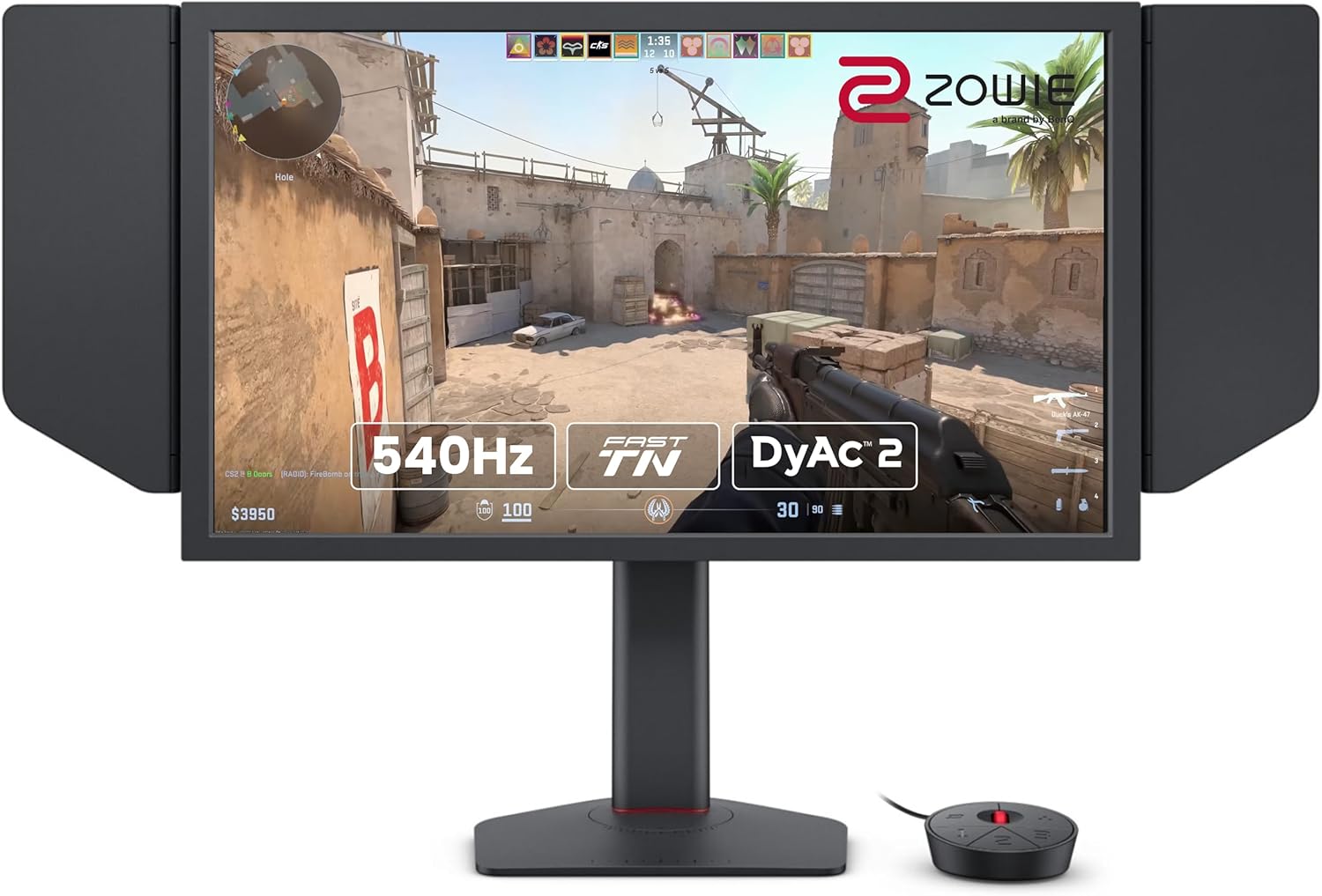
If you play esports games with an intense focus on every frame, the BenQ Zowie XL2586X is designed to help you respond faster and remain engaged in. You can focus on identifying targets instead of battling distracting afterimages when the action gets chaotic since it employs a Fast TN panel to keep moving outlines clearer and sharper.
Lessening the occurrence of strange “ghost trails” that could detract from your aim, Zowie adjusted the TN panel to lessen overshoot caused by extreme overdrive. Spotting movement is less of a scavenger hunt now that they improved color performance by around 35% to make opponents stand out from the backdrop, which is especially helpful considering classic TN can appear a bit washed out.
Where this monitor truly shines is in its blur reduction capabilities. With Dynamic Accuracy and its dual lighting design, you may enjoy longer practice sessions without straining your eyes by seeing more clearly in low light. When you’re grinding, you want less blur, less strain, and more focus.
The configuration? Zowie also attempts to make that as painless as possible. You can avoid wasting twenty minutes recreating your “perfect” configuration by using XL Setting to Share to transfer your preferred setting from one PC to another. Also, it can change color modes depending on what’s shown, so you won’t have to fiddle with the settings mid-match.
Plus, the new industrial-grade bearing height adjustment makes it easier and smoother to dial in your ideal position, which is crucial for comfort when sitting for hours. Consistency, clarity, and control are the hallmarks of this straightforward esports monitor.
4. Alienware AW3423DWF – Best Curved Gaming Monitor

The Alienware AW3423DWF is here to splurge on you if you’re in the market for a curved gaming monitor with a futuristic design and terrifying performance. Using Quantum Dot technology, the 34-inch 21:9 QD-OLED panel pushes brighter highlights and a broader color gamut than regular WOLED—all while delivering the basics of OLED: true blacks and the “infinite contrast” wow that instantly elevates the feel of games and movies.
The other half of magic is speed. With AMD FreeSync Premium Pro, you enjoy ultra-low latency games with silky smooth action and support for high dynamic range (HDR) for deeper highlights and more dramatic impact. There will be less time spent criticizing the screen for your blunders, and fast pans will remain clean. Dark scenes will also remain detailed.
Alienware went over and beyond with the aesthetics, making it look like the real deal. The legend 2.0 design adds “spaceship chic,” the 1800R curvature brings the action closer, and the configurable AlienFX RGB lighting allows you add just the appropriate amount of gaming glow. There are also practical benefits: The stand’s height, tilt, swivel, and slant adjustments ensure your comfort even when you’re locked in, while 360° ventilation aids in heat management and cable management prevents your setup from becoming spaghetti.When it comes to color-critical work, Creator Mode is your secret weapon. It helps you maintain things accurate when things get serious, which is great for content creators.
5. KOORUI G2411P – Best Budget Gaming Monitor

The KOORUI G2411P is just what you need if you’re looking for an affordable gaming monitor that doesn’t slouch. With its 23.8-inch Fast IPS display and 200Hz refresh rate, the screen tearing won’t dampen your win celebration, and the motion looks absolutely silky smooth. Also, going with 1080p is a good move because it’s easier on the GPU, allowing you to go for better and steadier frame rates without having to upgrade your entire system.
Real-life gaming is also embedded into it. With the 5-way joystick, navigating the menu is a breeze—no more “menu maze”—and staying focused during intense matches is a breeze with the help of features like a timer and crosshair. Thanks to flicker-free technology and a blue light filter, long sessions won’t hurt your eyes as much, whether you’re working all day or grinding ranks.
Wide viewing angles, vivid colors, and smoother gradients are all benefits of that Fast IPS panel, which makes games seem cleaner and regular stuff doesn’t look washed out.When it comes to workspace and comfort, KOORUI is on the money. You can change out the stand to make more space if you’re setting up neatly, the stand tilts from -5° to 20° to alleviate neck fatigue, and the design is incredibly thin, giving it a modern appeal.
With the help of HDMI and DisplayPort, connecting to a computer, laptop, or Xbox is a breeze. A “best budget” option should be quick, comfortable, and inexpensive.
Things to Consider Before Buying a Gaming Monitor:
Over the next few minutes you’ll learn how to choose a gaming monitor that matches your hardware, playstyle and budget: panel type, resolution and refresh rate, response time, adaptive sync, inputs, HDR, color accuracy, and ergonomics all affect performance and experience-prioritize compatibility with your GPU, desired frame rates, and seating distance to make an informed purchase.
Refresh Rate
You should target 144Hz as the baseline for modern competitive and fast-paced titles, while 240-360Hz benefits pro-level FPS where every millisecond counts; a 60Hz panel still suffices for single-player RPGs, but to take advantage of 144Hz you need a GPU that consistently outputs comparable FPS-for instance, an RTX 3070 can push 1440p144 in many esports titles with medium-high settings.
Resolution
Think in terms of pixel counts: 1080p (1920×1080) is GPU-light and pairs well with 144-360Hz, 1440p (2560×1440) offers a balance of clarity and performance for 27″ screens, and 4K (3840×2160) delivers sharp visuals but typically requires an RTX 3080/6800 XT or better to reach high frame rates in modern AAA games.
For practical planning, match resolution to screen size and GPU: a 27″ 1440p panel yields ~109 PPI for crispness without oversampling, while 32″+ 4K provides ~140 PPI but demands ~2-4× the GPU power versus 1440p at the same settings; competitive gamers often choose 1080p for maximum FPS, whereas content creators and immersion seekers lean toward 1440p or 4K.
Panel Technology
You’ll weigh TN for 1ms pixels and extreme refresh, IPS for color accuracy and 1000:1 contrast with wide angles, and VA for superior static contrast (often 3000:1) at the cost of slower transitions; OLED and mini‑LED push contrast and HDR, but check response times, HDR peak brightness (600-1000+ nits), and potential burn‑in risks before committing.
Dive deeper into examples: a Samsung Odyssey G7 (VA) delivers 240Hz with strong contrast but can show slight ghosting, while ASUS ROG Swift (IPS) models hit 240Hz with DCI‑P3 ~90-95% for creators; if you want HDR, prioritize peak luminance and local dimming-mini‑LED models like some 32″ displays reach 1000 nits and much better HDR tone mapping than basic HDR10 monitors.
Size and Aspect Ratio
You’ll find 24-27″ 16:9 monitors excel for esports, while 27″ 1440p (~108 PPI) balances sharpness and GPU demand; 32″ 4K offers more desktop real estate but needs a powerful GPU to run games at native settings. Ultrawide 34″ 3440×1440 (21:9) expands horizontal FOV for immersion, and 32:9 super ultrawides can replace dual monitors-measure desk depth and viewing distance to ensure comfortable ergonomics.
Response Time
Response time, expressed in milliseconds, determines pixel transition speed and influences ghosting; 1ms GtG panels minimize trailing for fast-paced shooters, whereas 4-5ms is fine for story-driven or single-player titles. You should compare both GtG and MPRT figures-manufacturers often quote optimistic 1ms MPRT numbers-while checking reviews for real-world motion clarity and overdrive artifacts.
A deeper dive: GtG measures pixel transition between gray levels and is the most common spec, while MPRT measures perceived blur using strobing; IPS and TN panels can advertise 1ms GtG, but practical results vary. Aim for GtG below the frame interval-under ~8.3ms for 120Hz and ~4.17ms for 240Hz-to avoid smear, and watch for inverse ghosting when overdrive is set to extreme; third-party tests with high-speed captures reveal the true behavior.
Budget Considerations
You can find solid 1080p 144 Hz monitors for, while 1440p 144 Hz models typically range and 4K 144 Hz or OLED panels often exceed; factor in cables, calibration tools, and extended warranties-many premium models include 1-3 year guarantees. Prioritize the features that affect gameplay per dollar: for example, a GPU that averages 120 FPS benefits more from 144 Hz at 1440p than from native 4K at 60 Hz if your budget is limited.
Brand Reputation
You should weigh manufacturer track records: LG leads in OLED and color accuracy, Samsung’s Odyssey series offers strong VA contrast and high refresh, and ASUS ROG/Acer Predator bundle gaming features plus robust warranty options; check independent reviews for RMA experiences because some models show higher rates of backlight bleed or dead pixels. Favor brands with local service centers and clear return policies to reduce downtime if you need a replacement.
Dive into test resources like Rtings and TFTCentral for measured input lag, color gamut (sRGB/DCI-P3 percentages), and uniformity-aim for under 10 ms input lag for competitive play and ≥95% sRGB for color work. Scan Reddit model threads and retailer return comments for real-world failure patterns, then verify warranty coverage (1-3 years) and dead-pixel policies so you know how fast the manufacturer will replace a defective panel.
Advantages
You benefit from clear tradeoffs: 1440p at 144Hz is a practical sweet spot where GPUs like an RTX 3070/4070 deliver 100-200 FPS on high settings, letting you exploit smoothness without jumping to 4K; IPS panels give color fidelity for streaming and editing; OLED and VA improve contrast for cinematic titles; and adaptive sync eliminates tearing, especially when frame rates fluctuate between 45-144 FPS.
Making the Purchase
Decide between authorized retailers for warranty assurance and reputable marketplaces for deals; compare return windows, restocking fees, and included cables. You should track prices across Amazon, Best Buy, Newegg, and manufacturer stores, consider seasonal sales (Prime Day, Black Friday), and factor in shipping time, local taxes, and any extended warranty costs.
Summing up
As a reminder, assess panel type, resolution, refresh rate, response time, adaptive sync, input lag, HDR, color accuracy, size, ergonomics, and ports against your GPU and gaming style; prioritize features that suit competitive or immersive play, set a realistic budget, and test a display in person when you can to confirm performance and comfort.
Leave a Reply