
Finding the best laptops for programming shouldn’t be a frustrating quest. Nothing kills your workflow faster than a sluggish machine that struggles to compile your code. To help you find the perfect coding laptop, we’ve tested the top models for every developer’s needs. This guide cuts through the noise, revealing powerful options that will elevate your productivity and let you focus on what truly matters. Let’s explore the machines that will effortlessly handle your most demanding projects.
Top 5 Laptops for Programming:
1. Apple MacBook Air 15 – Best Laptop for Programming Overall

If you want performance without the bulk, then your new coding companion is the Apple MacBook Air 15 that comes fitted with the M3 chip. It has that perfect fusion of muscle and minimalism — a lean, mean machine that moves through lines of code like they were yesterday’s meatloaf. Thanks to a fast 8-core CPU and up to 10-core GPU, you’ll compile, multitask or create at warp speed while sipping battery life that last as long as 18 hours. That’s right — 18 hours.
You’ll appreciate how easily portable it is. We’re talking not much thicker than a half-inch and lighter than your daily workload. The 15.3-inch Liquid Retina display is outright eye candy, with more than a billion colors to give you razor-sharp detail when you’re debugging or binge-watching after a long sprint.
And let’s discuss the experience. The 1080p FaceTime HD camera helps you look your best on video calls from home, and the three-mic array and six-speaker sound system with Spatial Audio ensure every voice or background noise that comes out of it is rich and clear. Toss in the fingerprint reader for quick, secure access to your machine, and you’ve got a laptop that’s personal — because it is.
With macOS and Apple Intelligence built in, MacBook Air is your perfectly portable, do-it-all notebook. You code more intelligently, you write more quickly, and you stay focused longer — and your data remains private. The MacBook Air 15 doesn’t just stay in this race, it comes leading.
2. Apple MacBook Pro 16 – Best Powerful Laptop for Programming

If you desire a laptop that handles monster builds like warm-ups and doesn’t forget how to sip battery, then the 16-inch MacBook Pro with M3 Max SoC appears to be your new natural home. You have desktop-class speed for Xcode, Docker stacks and local models – backed by 36GB of unified memory so your editor stays responsive even when your tabs go rogue. And a quick 1TB SSD, opens up huge repos before your coffee gets cold.
The Liquid Retina XDR display is impressively bright and color-accurate, so code, charts and timelines always look sharp — up to 1,600 nits of peak brightness. You’ll also look and sound legit on calls, courtesy of the 1080p camera, studio-quality three-mic array and six-speaker system with Spatial Audio — stand-ups don’t have to cut through static like tin cans.
Its battery life extends to 22 hours; you can compile, test, ship off charger and never worry about losing power. Plug in or don’t — nothing changes.
The chassis is typical Pro: cool, quiet and sculpted for road-warrior life. The ports take care of your daily dance — external displays, fast storage, docks — so you don’t have to live that dongle drama. When you find yourself refactoring in the middle of the night, those two facts (a backlit keyboard and glass trackpad real estate) make it weirdly enjoyable.
You construct large things and won’t tolerate inventions of slowdown. This MacBook Pro has speed, endurance and a killer display, but the design feels stale.
3. Lenovo ThinkPad X1 Gen 13 Aura Edition – Best Ultraportable Laptop for Programming
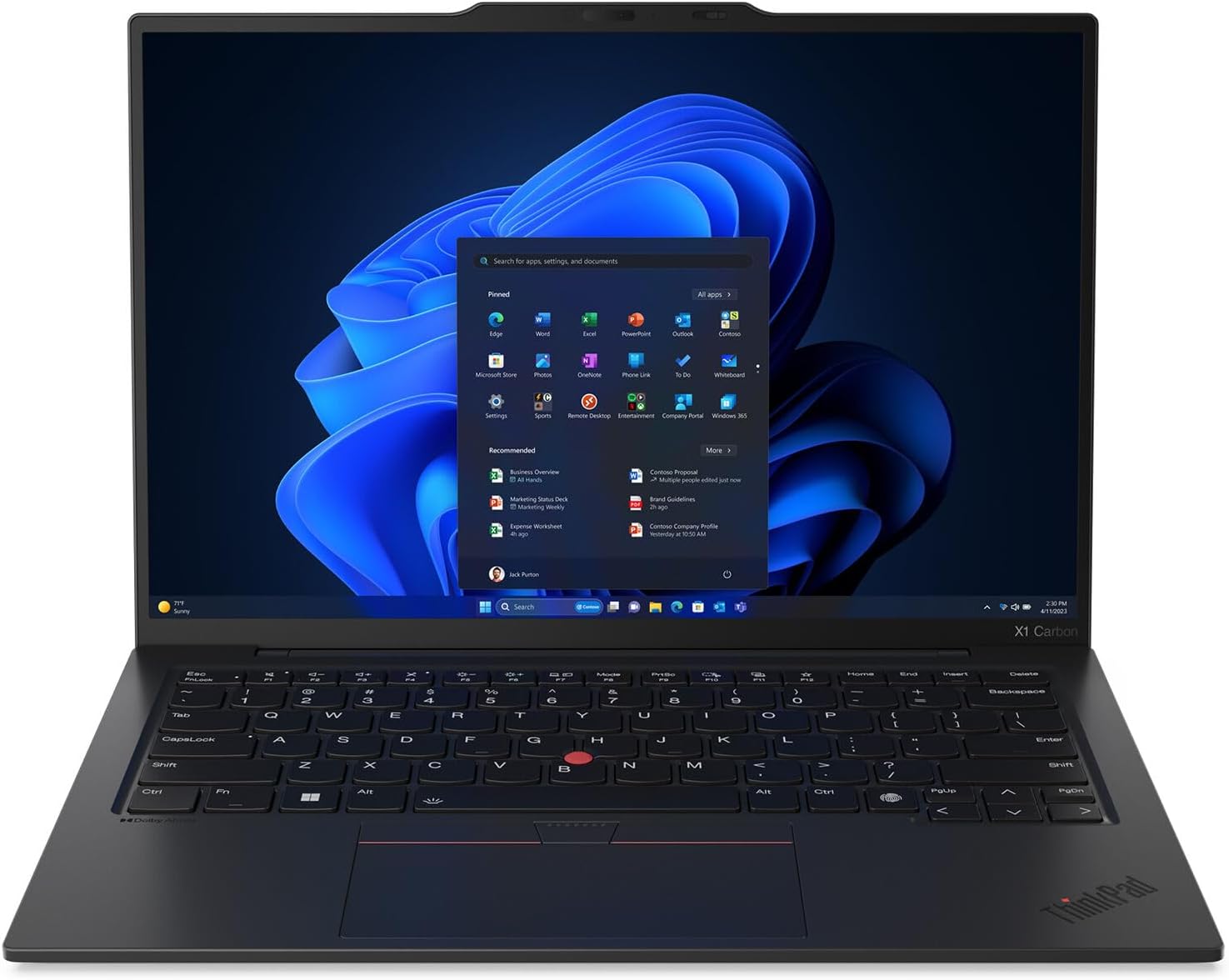
If you want heavyweight desktop-class focus in a featherweight chassis, the ThinkPad X1 Carbon Gen 13 Aura Edition is that type of stealth laptop. You get a 14-inch anti-glare display that remains readable under pow’s brutal office lights and café sunshine, plus a chassis so light you’ll forget it’s in your bag. Swoosh it open with one hand, or finger, or smooth flex — like you meant to do that.
Under the hood an Intel Core Ultra 7 works with 32GB memory to keep your IDE snappy, your containers humming, your two dozen dev tools from stepping all over each other. A spacious 2TB SSD offers your repos, datasets and VMs the VIP lounge they deserve. And with Windows 11 Pro, you get the admin knobs and security features that you actually use.
Typing? Glorious. The backlit ThinkPad keyboard is still best in class but adds spill resistance for those occasional coffee oops brought about by a lethargic sprint across your office. Security? Just tap on the fingerprint reader and you’re in — no embarrassing password charades.
Connectivity is the flex: lots of ports for that external monitor, fast file transfer, quick-charging your phone — and yes, a dependable audio jack if you’re delightfully old-school. The integrated graphics are polite in how much power they draw, but they’ll definitely get you through the average day of dev or debugging, and some casual design as well.
Fast Coding, and Light Travel Fast coding with a laptop that won’t complain about it. The X1 Carbon Gen 13 Aura Edition does that and more — efficiently, smartly and with just the right amount of ThinkPad swag.
4. ASUS Zenbook S 13 OLED – Best Lightweight Laptop for Programming

If you need a laptop that vanishes in your bag and comes through for every deadline, then the ASUS Zenbook S 13 OLED is your ultralight ringer. Its 2.2 lb, and 0.46”, so it’s essentially a hardcover novel— except this bad boy writes code, runs containers, and saves your shoulders along the way. The 13.3″ OLED display displays inky blacks and razor text, so your code appears cleaner, your diffs are more distinct and long reading sessions are easier on your eyes.
Beneath the shell, the AI-focused Intel Core Ultra 7 155U joins forces with 32GB of LPDDR5x RAM and a 1TB SSD. Translation: faster builds, quicker search results, instant project jumps and enough room for repos, data sets. The integrated Intel graphics don’t use much power while speeding along those everyday dev tasks or the smooth UI rendering
You get Windows 11 Pro for the admin switches you’ll actually use and a dedicated Copilot key for when you need a nudge—draft that message, summarize notes, stub out boilerplate or wrangle a to-do all without breaking your flow. HD Audio will make your calls clear and your lo-fi playlists warm during focus sprints.
Dressed in Basalt Grey, it looks stylish without appearing overly shouty — the chassis is sleek and strong, and built to take a beating. Bottom line: you’re traveling light and building fast. This Zenbook can keep up, stay cool and get you shipping.
5. Dell Inspiron 15 – Best Budget Laptop for Programming

If you’re looking for a low-drama coding sidekick that won’t empty your wallet, Dell’s Inspiron 15 is the dependable, affordable choice. All of that in a roomy 15.6-inch DISPLAY FOR split screens, logs and some late-night tutorials in clean platinum silver that’s sharper than your DIF. Under the hood, a Core i5 and 16GB of RAM keep your IDE snappy, your tests fast, and your browser tabs from taking over. An accelerated 512GB SSD delivers faster boot times for your workflow and accelerate what you do naturally work, play and create so that you can accomplish more.
You will also love the keyboard—full-sized, comfortable, and yes you guessed it—there’s a numeric keypad for those fast calculations or when you need a shortcut wizard. The lift hinge also provides a slight typing angle that is healthier for your wrists during marathon sessions. Ports? Plenty. Helmets on with those monitors, drives, that trusty old mechanical keyboard or even just some dumpy USB stick from 2014—no awkward dongle dance necessary.
Adaptive thermals intelligently keep your system cool while your couch browsing or rock out at the desk. And when it’s time to hop on a stand-up, the FHD camera with noise reduction and wide dynamic range makes you look clear (and professional), not like a pixelated cryptid.
Chromebooks can now sport Windows 11 Home, Finally, a friendly playground for your tools, shells and frameworks. You code, it catches up — quietly, efficiently and affordably.
Things to Consider Before Buying a Laptops for Programming:
Many aspects influence whether a laptop will meet your programming needs, from CPU cores and clock speed to RAM capacity, storage type and size, display clarity, keyboard comfort, battery life, and thermals. You should prioritize the languages and tools you use, weigh portability against performance, and plan for future upgrades to ensure long-term value.
Types of Laptops for Programming
You should match laptop class to your workloads: light web development runs fine on 8–16GB ultrabooks, while large codebases, Docker containers, or local ML training benefit from 16–64GB and discrete GPUs. For example, a 14″ ultrabook with an M2 or 12th‑gen Intel i5, 16GB RAM, and 512GB NVMe suits travel; a 15.6″ machine with Ryzen 7/Intel i7, 32GB RAM, and RTX 3060 speeds up GPU tasks and compilation. Balance weight, battery (6–12 hours), and price against your typical projects.
Ultrabooks
You benefit from ultrabooks when mobility matters: models like the Dell XPS 13 or MacBook Air/Pro 13 often weigh ~1.2kg, offer 8–16GB RAM and 256–1TB NVMe, and deliver 8–12+ hours in typical coding sessions; they handle VS Code, Docker (light), and remote development well. If you travel a lot, prioritize a bright 500+ nit display, 14″ 16:10 aspect for more vertical code, and at least 16GB if you run multiple containers or browser tabs.
Gaming Laptops
You get raw GPU and CPU power from gaming laptops—think 15.6″ chassis with Ryzen 7/Intel i7, 16–32GB RAM, and RTX 3060–3070 class GPUs. They weigh 2.2–3kg and often provide high‑refresh panels useful for UI responsiveness; battery typically drops to 3–6 hours under load. Choose SDD + secondary storage and 32GB if you train models or run many VMs locally.
For deeper consideration, pay attention to GPU TGP (80–150W typical) and cooling: higher TGP means sustained throughput for CUDA tasks but also more fan noise and heat. Models like ASUS ROG, Lenovo Legion, and MSI often expose performance modes; in practice, switching to “performance” can double sustained rendering or training speeds versus “balanced.” Expect prices from ~$1,000 for RTX 3060 builds to $2,000+ for RTX 3070/3080 with 32GB and dual‑NVMe setups, and factor in external monitors or docking if you use the laptop as a desktop replacement.
Processor Performance
If you compile large codebases or run multiple containers, favor CPUs with 6–8 cores and strong single-thread clocks—Intel Core i5/i7 (10th gen+) or AMD Ryzen 5/7 are typical choices. Aim for base clocks around 2.5+ GHz with boost to ~4+ GHz; more cores help parallel builds and VM density, while higher boost clocks speed single-threaded tasks like many editor plugins. Check laptop thermals to avoid prolonged throttling under load.
RAM and Storage Requirements
You should target 16GB as a baseline for general development, upgrade to 32GB if you run several VMs, Docker containers, or large datasets, and consider 64GB for heavy data-science workflows. For storage, pick an NVMe SSD of at least 512GB for OS and projects; add a 1TB secondary or external drive for datasets and backups. Dual-channel memory and upgradable SODIMM slots improve longevity and performance.
Inspect memory type and SSD interface: DDR4-3200 is common while DDR5 gives higher bandwidth if supported, and SODIMM slots let you add modules later. For NVMe, PCIe 3.0 drives typically deliver 1,500–3,500 MB/s, PCIe 4.0 pushes 5,000–7,000 MB/s—choose based on motherboard support. Also review SSD endurance (TBW ratings around 300–600+ for consumer drives), configure swap/zram appropriately, and use cloud or external storage for very large datasets to preserve local SSD space.
Battery Life Considerations
You should target 8+ hours for light coding and 5–7 hours under mixed use; aim for a 50–70 Wh battery as a baseline. Expect 4K/OLED panels and high-TDP CPUs to drop runtime substantially. Verify vendor battery-life tests or third-party reviews that measure real-world workloads like continuous compiling or browser-heavy sessions.
Display Quality and Size
Choose between 13–17 inches based on mobility versus screen real estate: 14–16 inches often balance both. Prefer 1080p for battery efficiency, 1440p for sharper text at ~100–125 PPI, and 4K only if you need detailed design work. Look for 300–500 nits brightness and at least 100% sRGB for accurate colors when you debug UI or view charts.
Pay attention to panel type and pixel density: IPS gives wide viewing angles and stable color, while OLED offers deeper blacks but can use more power and risk burn-in with static IDE layouts. Check scaling support for your OS—Windows scaling at 150% on 13–14″ 1440p can make UI elements consistent. Also consider matte anti-glare finishes for long coding sessions and the option to connect one or two external 24–27″ 1440p monitors for extended desktop productivity.
Advantages of High-End Models
You gain consistently faster compile and test cycles with high-end CPUs and 32+ GB RAM, and GPUs that accelerate ML workflows; for example, an M1 Pro/Max or an Intel i9 with 32 GB often cuts build times by 20–40% versus midrange hardware, improves VM density, and provides premium displays and keyboards that reduce fatigue during multi-hour sessions.
Disadvantages of Budget Options
You’ll save up front but often trade off RAM, storage speed, and thermals—many sub-$700 laptops ship with 8 GB or soldered RAM and slower eMMC/5400 RPM SSDs, which can double iteration time when running containers, heavy editors, or local databases.
Digging deeper, budget machines frequently bottleneck when you run multiple Docker containers, Android emulators, or several browser tabs with dev tools; swapping to disk becomes common if you have under 16 GB of RAM, and weak cooling can force the CPU to drop clock speeds by 20–40% during prolonged builds. If you rely on local testing or parallel jobs, plan for at least 16 GB RAM and NVMe storage, or expect slower CI offloads and more waiting during development cycles.
Gathering User Feedback
You should filter reviews from buyers with similar workflows—look for at least 100 reviews with a 4+ average, and focus on mentions of thermal throttling, keyboard travel (1.0–1.5 mm), and sustained CPU performance under load. Use platform-specific filters on Amazon, Best Buy, and Reddit threads in r/suggestalaptop to find real-world notes like battery drop after 6–12 months or fan noise above 45 dB during builds. Give more weight to long-term follow-ups and repairability comments.
Analyzing Expert Opinions
You should compare lab-tested metrics from Notebookcheck, AnandTech, and TechRadar—pay attention to measured display brightness (nits), color coverage (sRGB/%), and thermal throttling numbers; a 300–400 nit panel with 95% sRGB is ample for coding and UI work. Use benchmark results like Geekbench and Cinebench to see sustained multicore performance rather than just peak burst scores, and prioritize reviews that include sustained-load heat and noise graphs.
When you read reviews, check methodology: prefer tests with 30-minute sustained stress runs and reported peak vs sustained Cinebench deltas—e.g., a peak 10,000 vs sustained 5,000 shows heavy throttling. Look for measured power draw (watts) and surface temps (°C) so you know whether a 45W CPU actually runs at 35W under load. Also consult teardown/repairability reports like iFixit and note component brands (Samsung/Western Digital SSDs) to assess longevity.
To wrap up
Presently, when buying a laptop for programming, you should prioritize a fast CPU, ample RAM (16GB+ if possible), an SSD, a comfortable keyboard and quality display, solid battery life, and good cooling; consider GPU needs, OS and toolchain compatibility, upgradeability, and warranty so your investment reliably supports your development workflows.
Leave a Reply