
Finding the best wireless gaming headsets can transform your entire experience. Tired of tangled cords and missing crucial audio cues? Unleash your true potential with flawless, lag-free sound that gives you a serious competitive edge. We’ve tested the top models for immersive audio and crystal-clear mic quality to help you discover the perfect fit. Let’s dive into the models that will help you dominate the game and cut the cord for good.
Top 5 Wireless Gaming Headsets:
1. Logitech G PRO X 2 LIGHTSPEED – Best Wireless Gaming Headset Overall

If you’re looking for a headset that treats every queue like grand finals, the Logitech G PRO X 2 LIGHTSPEED is your competitive cheat code. Decompress with the ultra-relaxed pressure and noise-isolating design of this Over-ear Comfort Headset, plus rugged rotating metal hinges that stand up to long play/use. Bank leatherette ear pads don’t just feel good, they also easily wipe clean or use slower-wearing breathable velour padding when it gets wild. The 38-ohm design plays friendly with virtually everything, which means you never have to switch out gear when you need it most.
The headliner is 50mm graphene drivers. They maintain low distortion and high detail, so footsteps, reloads and ult cues slot directly into place right where you expect them. Translation: less “where was that at?” moments and more clean clutches.
Connectivity remains exactly the way you want it: LIGHTSPEED wireless for long battery life and lag-free performance while training or winning tournaments (The USB nano receiver is stored in the back of the left earcup), Bluetooth for on-the-fly audio sharing, and a 3.5mm jack for connecting to platforms with fewer ports. Logitech throws in the kit—USB-A to USB-C cable, USB-A dongle with 3.5mm port and a 3.5mm audio cable so moving between PC, console or handheld is seamless.
You provide the sense inside the game; it provides the stage, the vision and longevity. For the ultimate comfort experience, surgical audio and pro-level wireless performance in a headset, Sign up for the PRO X 2 – no more fumbling with cables and nothing to disrupt your build or matchmaking.
2. SteelSeries Arctis Nova Pro – Best Multiplatform Wireless Gaming Headset

YOU SHOULDN’T HAVE A PC AND A PS5 BUT IF YOU DO AND ALSO NEED AN XBOX HEADSET BUT ALSO WANT TO PLAY SWITCH FOR SOME REASON WELL THEN THIS IS THE HEADSET FOR THAT. The SteelSeries Arctis Nova Pro provides Almighty Audio through high-fidelity drivers (with premium speaker drivers with high-density magnet rings ) and mastering-standard precision with Sonar’s pro-grade parametric EQists, whether you’re tightening footsteps, taming explosions or boosting dialog – without ever leaving the action.
You’ll work inside the soundstage with 360° Spatial Audio, and be well-positioned to hear virtual surround sound through Tempest 3D AudioTech and Microsoft Spatial Sound. Need focus? The 4-mic hybrid Active Noise Cancellation quiets the room. Need awareness? Transparency Mode allows you to dial in just the amount of real world that sneaks back in.
Battery fear? Retired. The Infinity Power System interchanges twin batteries so your ride never ends unless you want it to. Park the base station on your worktable, plug in two USB sources and click between PC, console or Mac to adjust EQ, volume level and ChatMix mastering at your finger tips.
Because life rolls mid-match, Dual Audio Streams run lag-free 2.4 GHz for your game and Bluetooth for listening to music and taking calls without stopping the action. Over-ear comfort and a friendly 38-ohm impedance make it smile on all of your gear, too.
You’re looking for a single wireless headset that can handle every platform. This is the Best Multiplatform Wireless Gaming Headset, with an advanced 2.4 GHz wireless and 50 mm Pro-G drivers for clear sound imaging and a professional soundscape tuned for gaming.
3. HyperX Cloud Alpha – Best Wireless Gaming Headset for Battery Life

If “just a quick match” has turned into a weeklong grind, this is the wireless headset that laughs at chargers. HyperX Cloud Alpha Wireless features up to 300 hours1 of battery life so you don’t have to worry about running out of power while in the middle of streaming a raid, climbing the ranks or pulling an all-nighter with friends. The 2.4GHz low-latency connection keeps you in the game with no drops in audio, giving you a competitive edge (and unlike Bluetooth, it delivers snappy response when seconds count).
Footsteps, reloads and spell cues are placed with precision from a 3D soundstageِ Get the competitive edge with DTS Headphone:X. HyperX’s Dual Chamber Drivers Separate the Bass from the Mids and Highs — Which Each Have Their Own Chamber — to Optimize Clarity of Both DistortionFree Sound The Cloud Alpha Headset Builds Upon HyperX’S Foundation Of Signature AwardWinn Premium Constructio, Leading COMFORT and Superior Sound To make Simply THE BEST Gaming headse They Have OneGeneratio Ahead Combining a pioneDual Chamb desig for responsibeat anically tuned curves circles for the most Technica: discerning gaming pros Nu Product 33% Lighwerght than it’s predec Nuntaw atc E. Seeking comms that slash through chaos? Plug in the handy detachable noise-canceling mic and take command of call plays like a pro; yank it out to savor your favorite tunes on the go. It works well cross-platform, too.
You want endurance without compromise. Cloud Alpha Wireless is World’s Best Cloud Alpha Wireless brings weeks of battery life, the artfully-sculpted sound of its 50mm drivers, and marathon-grade comfort to desktop or anywhere in your home.
4. Razer BlackShark V2 Pro – Best Wireless Gaming Headset for Esports

If coordinated callouts and crisp comms win you games, the Razer BlackShark V2 Pro is your secret buff. You’ll have Razer HyperClear Super Cardioid mic tech—a drop-off in the pickup happens at 18 kHz to way into the ultrasonic range so your voice doesn’t quite get lost in background noise.The Pickup Pattern on this provides a vocal pick-up far from its background.High-Frequency clarity and Razor Sharp accuracy make this one of GB’s best friends. Beneath the sleek all-metal exterior, TriForce Titanium 50mm drivers cut through the Low End, Mid Range, and High end with supreme clarity that no one else in gaming has.Want to sound stage like you’re cranked up? Then go for it – all of our headsets feature drivers that are treated with cutting-edge software to deliver powerful surround sound capabilities.
You’ll do it over Razer HyperSpeed 2.4 GHz wireless for a true audiophile experience, free of lag and perfectly in sync with your game — attainable only on PC. And when you want to sweat the small stuff, take a breather and launch that all-new pro-tuned Fps audio profile—we’ve crafted with top esports athletes to hop straight into the K/D-obsessed crowd breaking down doors round after round.
Comfort? Sorted. The over-ear cups with ultra-soft memory foam deliver a comfortable, noise-isolating fit and keep you cool during those epic gaming sessions. The 32-ohm impedance is friendly to your setup, and the USB-C charging delivers up to 70 hours of battery life so you’re prepping strategies — not cables.
The bottom line is, you keep your head in the game and let BlackShark V2 Pro take care of the sound,the callouts and comfort. Your team hears you. Your enemies don’t.
5. Logitech G435 LIGHTSPEED – Best Budget Wireless Gaming Headset
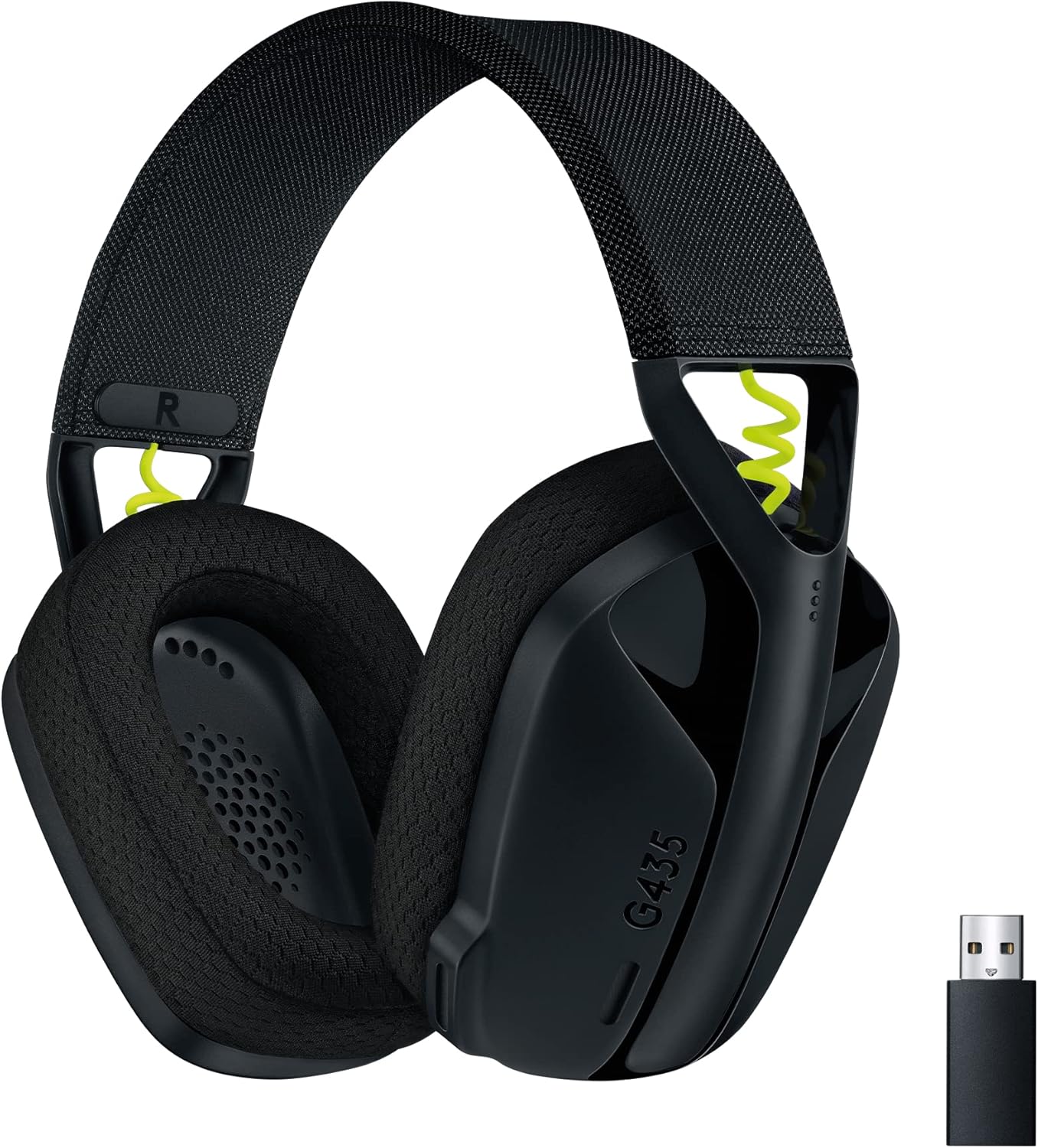
If you’re looking for a wallet-friendly headset that plays like it bypassed the “budget” tier, look no further than the Logitech G435 LIGHTSPEED: It’s your quiet flex. The first to combine pro-grade LIGHTSPEED wireless and low-latency Bluetooth, you can switch seamlessly between 2.4 GHz and Bluetooth on the fly, so they are both at your ears whether in either location with no delay or disconnect issue. This over-ear featherweight can either disappear, or become a part of the mix and is so light you will forget you are wearing it – your neck will think you took it off.
Your callouts remain clear without a boom arm jutting in your face. Active noise canceling using dual beamforming microphones blocks out your voice and background noise, so teammates only hear you call the shots, not your keyboard strokes. The 40mm drivers offer powerful, balanced sound and with the support of Dolby Atmos, Tempest 3D AudioTech, and Windows Sonic you can experience your in-game decisions with a high-fidelity preview that sounds the way instinct compels.Return to Homepage Balanced sound – A big step up from Gold Wireless Headset supporting powerful 40mm speaker drivers in a pair of comfortable On-Ear earcups. Translation: you get a mini-map for your ears.
Battery anxiety? Not here. You have as much as 18 hours to play, chat and queue up again. The 45-ohm impedance is lovely and easy across devices, too, and the noise-reducing, memory-foam pads make things comfortable — notably for smaller heads — without that “loose helmet” wobble.
You want white, fast and clutch. That’s it: LIGHTSPEED for sweaty ranks, Bluetooth for between-match bops and zero hassle in between. If you’re looking for lightweight convenience, crystal-clear comms on your next-gen console and surprisingly big sound in a sweet price vibe, rock G435 loud and proud with no boom and all boom.
Things to Consider Before Buying a Wireless Gaming Headset:
Over the next few minutes you’ll learn to assess audio quality, wireless latency, comfort, battery life, microphone performance, and platform compatibility so you can pick a headset that fits your playstyle and budget; weigh features like surround sound, driver size, build quality, and warranty, and test fit and controls to ensure long sessions stay comfortable and responsive.
Over-Ear Headsets
You’ll get the largest drivers and best passive isolation with over-ear units, delivering deeper bass and wider soundstage for single-player or cinematic titles; many models offer ANC and detachable booms, battery life commonly sits between 20 and 35 hours, and examples like SteelSeries Arctis or Astro A50 show how feature sets scale with price.
On-Ear Headsets
You’ll notice on-ear designs trade some isolation for reduced weight and greater portability, with drivers around 30–40 mm and batteries typically in the 10–20 hour range; they suit mixed-use players who move between couches, desks, and commutes without wanting full over-ear bulk.
Fit matters: you should test clamping force and pad material since prolonged sessions can cause ear pressure; also evaluate microphone placement and wireless codec support—models that support aptX or low-latency USB dongles often shave tens of milliseconds off audio delay, which impacts competitive play.
In-Ear Headsets
You’ll find in-ear earbuds excel at portability and mobile gaming, offering true wireless options with single-charge runtimes of 4–8 hours and charging cases that add 12–24 hours; active low-latency gaming modes reduce Bluetooth lag and foam tips can significantly improve bass and spatial perception.
Fit and seal are decisive: using memory-foam tips can boost perceived bass and isolation, driver size (6–10 mm) shapes frequency response, and IP ratings matter if you game while exercising; for voice chat, check whether the buds use beamforming mics or rely on your device’s mic for clarity.
Perceiving spatial cues accurately depends on driver size, ear seal, and whether the design is open or closed, so match headset type to the games you play.
Sound Quality
You want clear imaging, punchy bass and consistent mids for both FPS cues and immersive single‑player audio; look for 40–50mm drivers with a frequency response at least covering 20Hz–20kHz, virtual surround (7.1) or Dolby/THX support for positional cues, and closed‑back designs if you need isolation. When testing, listen for stereo separation on footsteps and low‑end control during explosions to see whether the headset preserves detail at different volumes.
Battery Life
You should target 20–40 hours of real‑world playback for wireless headsets, noting that features like RGB, active noise cancellation, and 2.4GHz transmission can reduce runtime; typical full charges take 2–3 hours, while many models offer a 10–15 minute fast charge that yields 1–3 hours of use. Track advertised vs reported runtimes from reviews, since lab claims often assume light use.
Deeper battery details: battery capacity commonly ranges from ~400mAh to 1,000mAh depending on size and feature set, and ANC or LED lighting can lower runtime by roughly 20–40% compared with baseline playback. You can extend life by disabling RGB, lowering mic monitoring, using wired mode for long sessions, or enabling power‑saving codecs when high fidelity isn’t required; also check whether the headset supports passthrough audio while charging so you can keep playing during long sessions.
Comfort and Fit
You should evaluate weight, clamping force and earcup materials: aim for a headset under ~350 g for marathon sessions, memory‑foam earcups with breathable fabric if you sweat, and an adjustable headband that distributes pressure evenly. Try different shapes — oval cups fit most ears better than small round pads — and check for swivels that let cups sit flush on your head without hotspots.
More on fit: pay attention to replaceable pads and headband suspension systems—models with removable cushions and a broader contact area reduce pressure over time and cost less to maintain. Test clamping force by wearing the headset for at least an hour; a firm but not pinching clamp (you should feel secure without numbness) is ideal, and materials like perforated leatherette or mesh will keep your ears cooler during sessions longer than four hours.
Compatibility with Your Devices
Check whether your platform supports the headset’s wireless protocol: Xbox uses Xbox Wireless natively (e.g., SteelSeries Arctis 9X), PlayStation often requires a USB dongle or official headset certification, and PC supports both USB 2.4 GHz dongles and Bluetooth—note Bluetooth can block mic input on some consoles. Verify connectors (USB-A vs USB-C) and multi-device pairing if you switch between PC, phone, and console frequently.
Wireless Range
Expect Bluetooth ranges around 8–10 meters (25–33 ft) in real environments and 2.4 GHz dongles to reach 10–15 meters (30–50 ft) line-of-sight; thick walls, other Wi‑Fi devices, and USB port placement often cut that in half. Latency and packet loss rise rapidly beyond these distances, so test in the room setups where you actually game.
Interference is the main limiter: crowded 2.4 GHz bands, USB 3.0 noise, and physical obstructions reduce range and increase latency. Plug the wireless dongle into a front-panel or extension cable to avoid motherboard interference, choose headsets advertising low-latency firmware (~20–30 ms for top models), and consider mesh placement if you frequently move between rooms; specific headsets like the Arctis 7 and Logitech G Pro Wireless report stable performance up to ~12 m in open spaces.
Build Quality
Look for metal-reinforced headbands, braided cables for wired backups, and replaceable ear cushions—these raise upfront cost but extend usable life from months to years. Typical flagship weights sit between 260–380 g; lighter models reduce fatigue but may compromise durability, so balance weight against materials and warranty length.
Inspect hinge and joint designs: single-piece aluminum frames resist bending, while plastic clips fail sooner under daily use. Check for user-replaceable parts (pads, headbands) and manufacturer service policies—brands offering 2-year warranties and spare parts (e.g., Sennheiser, SteelSeries) tend to yield lower total cost of ownership. Also consider IP ratings if you sweat during sessions and want waterproofing around ear seals and boom mics.
Researching Options
You should compare specific models and specs rather than relying on brand names: check battery life (20–40 hours), latency figures, codec support (aptX LL, LDAC, LE Audio), and platform notes—for example, Xbox often needs native wireless while PS5 works well with USB dongles. Read hands-on reviews and look for comparisons between models like SteelSeries Arctis, Logitech G, Razer, and Astro to spot trade-offs in mic clarity, driver size, and firmware updates.
Testing for Comfort
You need to wear a headset for at least 30–60 minutes to gauge clamp pressure, ear‑cup fit, and heat buildup; test with glasses if you wear them and note any ear pinching or headband hotspots. Prefer lighter units (under ~350 g) and breathable ear materials for sessions over two hours.
When you test, run a 2–3 hour play session with voice chat to evaluate long-term comfort: check for pressure at the temples, foam recovery speed, and whether cups compress against your ears. Compare memory foam versus softer open-cell foam, inspect headband padding thickness, and try different tilt positions—models with modular pads or adjustable yokes often give better fit options for varied head shapes.
Making the Purchase
You should buy from authorized retailers or the manufacturer to secure a 1–2 year warranty and a 14–30 day return window; inspect for firmware support and bundled accessories like USB dongles, carrying cases, or spare pads. Use price trackers and watch for bundle deals during sales to get better value.
After purchase, register your headset for warranty, check for initial firmware updates to fix latency or EQ issues, and test every function within the return window—battery longevity, mic performance in noisy environments, and dongle range (verify 10–15 m line‑of‑sight). If you rely on competitive play, confirm you can use wired mode while charging as a fallback.
To wrap up
As a reminder, before buying a wireless gaming headset you should weigh audio fidelity, microphone clarity, latency, battery life, comfort for long sessions, wireless standards and platform compatibility, build quality and fit, software/customization options, and total cost including warranty and support to ensure the headset meets your playstyle and setup.
Leave a Reply