
Tired of your PC sounding like a jet engine? Finding the best CPU air coolers is essential to stop frustrating thermal throttling and unlock your rig’s true power. Poor cooling can destroy your performance, but you don’t have to settle. We’ve rigorously tested the top models to bring you the definitive guide to silent, efficient cooling. Let’s dive in and find the perfect cooler to keep your system frosty and fast, no matter the workload.
Top 5 CPU Air Coolers:
1. Noctua NH-D15 – Best CPU Air Cooler Overall
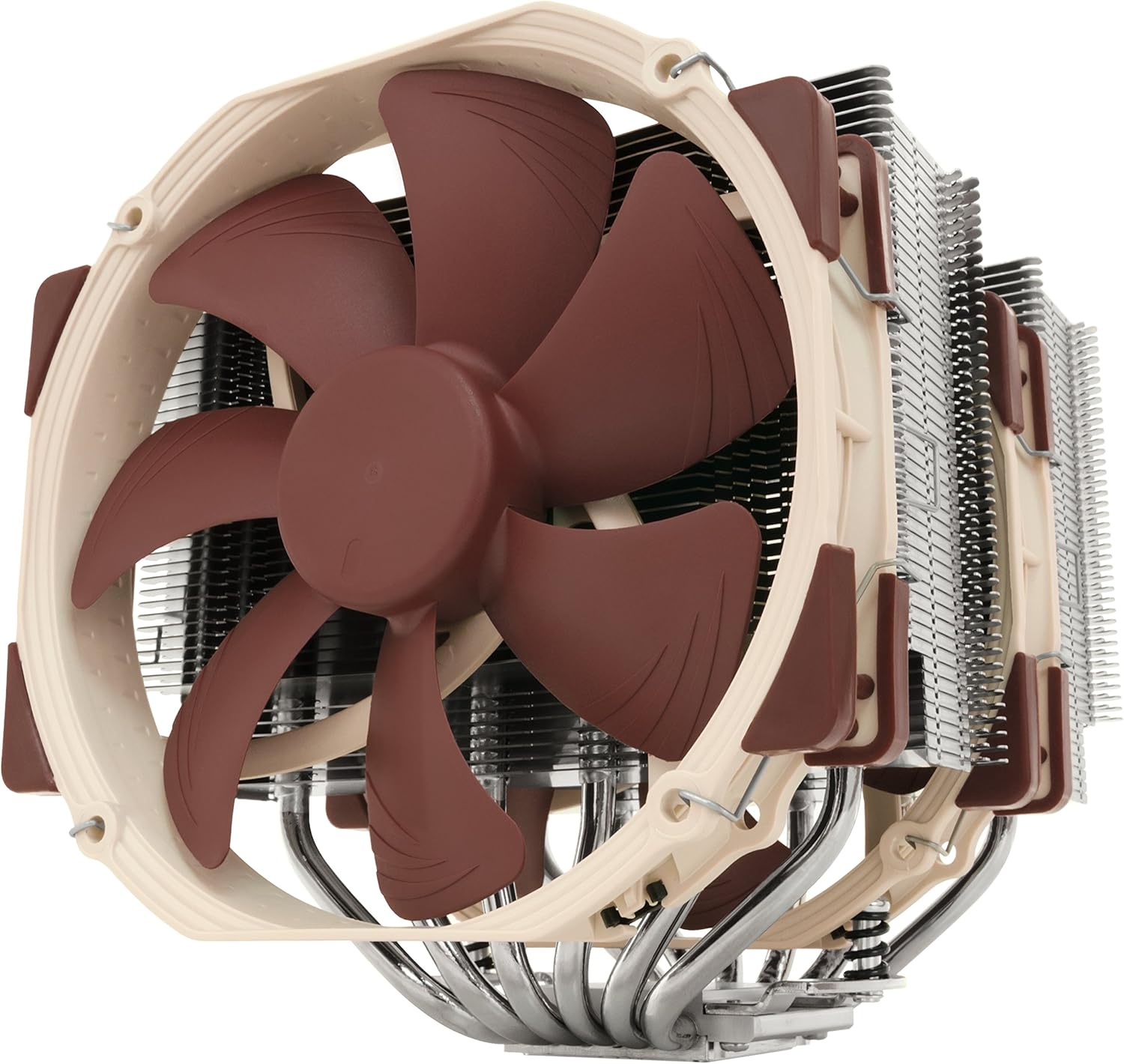
If you crave ice-cold temperatures but don’t invite the sound of a jet engine, then the Noctua NH-D15 is your kind of legend. You’re going to get a top-of-the-line dual-tower heatsink that’s paired up with 6 heatpipes, and two 140 mm NF-A15 fans when you’re transferring air like it’s your job, then turns into total silence with PWM control and Low-Noise Adaptors for relative silent operation. Translation: crank the overclock when things get spicy, or drive some dead-silent running when you’re firing up a mission and have got to chill — either way, you are in control of your CPU’s thermals.
You care about pedigree? This cooler is the complete upgrade compared to stock and its predecessor, a 250W TDP cooling efficiency. Beneath it all, a copper base and themalpipes maintain good contact with the GPU, translating into secure thermal transfer you can rely on when the going gets hot. At full blast, the fans max out at about 1500 RPM, but noise hits a tranquil 24.6 dB – more “library” than “launchpad.”
Installation is easy enough, just a regular 4-pin PWM plug and some 12 V power, as well as an abysmal 1.56 W consumption. Slap it into your desktop and you’ve just hired a silent bodyguard to protect your processor. Whether you’re overclocking your rig or simply need a cooler for the hottest CPUs, the NH-D15 is the high efficiency choice to tame your TDPs without losing in acoustics.
You crave cooler temperatures, fewer decibels and hardware you won’t fret over. The Noctua NH-D15 comes, locks and loads your rig with the sweet satisfaction of no sound.
2. be quiet! Dark Rock Pro 5 – Best Quiet High-End CPU Air Cooler

If you need high-end cooling that’s virtually silent, be quiet! The Dark Rock Pro 5 is your silent upgrade. You also get seven 7mm copper heat pipes underneath a special black coating with ceramic particles underpinning it all, leading to a dense aluminum fin stack and keeping things running frosty—whether you’re pushing the pedal to the metal with aggressive overclocks or chugging along on lengthy renders.
The two Silent Wings PWM fans are the secret sauce here: fluid-dynamic bearings, smooth 6-pole motors and airflow-optimized blades. The front fan’s funnel-shaped inlets are a major positive as they build up tremendous air pressure, while the decoupled and vibration-dampened mounts prevent turbulence before it reaches your ears. Net result? Big-league cooling and a claimed 23.3 dB hush that won’t hijack your soundscape.
Control is simple. Choose your vibe Customise your laptop with included RGB Split Zone Keyboard Easier on the eyes Anti-glare display Free your USB ports Powering devices ind outSmart and Cool By maximizing airflow with Advanced thermal cooling, external temperatures are 5%faster than the previous generation while this system is 7%faster at heat dissipation. With 4-pin PWM and standard 12-volt line, it fits tidily into your build, while 280W thermal headroom means you can push hard and not have to worry about the CPU throttle.
You want power with restraint, fancy materials without the diva attitude and an installation that seems purpose-built. When efficiency is all that matters Dark Rock Pro 5 provides—cool, composed in confidence. This is the Best Quiet High-End CPU Cooler for those who don’t want to sacrifice silence without compromising cooling performance.
3. Noctua NH-L12S – Best Low-Profile CPU Air Cooler
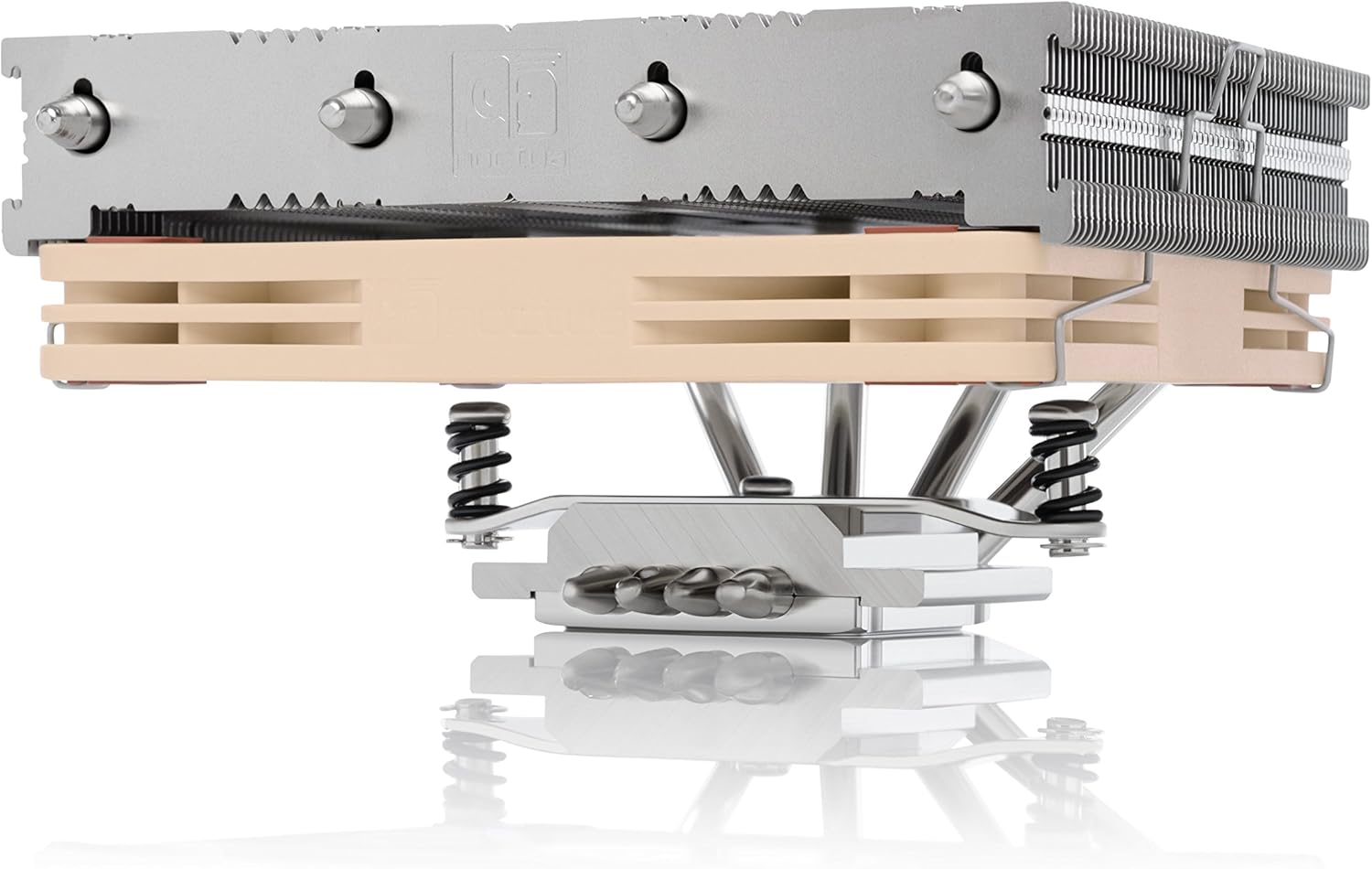
If you’re”going small, the NH-L12S is as tiny as 70mm fans and will have your compact HTPC / Small Form Factor PC running smooth while not breaking the bank.Despite being a slimmer design, Noctua did not have to sacrifice performance. At 70 mm, it sinks into the smallest SFF cases with nary a whimper (it operates at just 23.9 dB, so your desk won’t sound like the departure gate of an airport) and gets to work right away.
You’re getting Noctua’s best when it comes to materials that matter: copper base and heat-pipes for impressive fast heat transfer, aluminum fins for exceptional dissipation, solder joints with a nickel plating so they don’t fall apart over time. Spin the fan up to 1850 RPM when you’re purging frames, or use the 4-pin control to keep things eerily cool at idle. At 94.2 cubic meters per hour, it does move serious air for its size but is able to do so without making your case sound like a wind tunnel.
Are you working with a desktop build and not enough RAM or, for example, a big bulky GPU? This cooler gets along well with crowded layouts, providing an honest-to-goodness thermal advantage in locales that even the tallest of towers will never fit. It’s air cooling as you’d want it — simple, reliable, and designed for equilibrium rather than bluster.
It’s voltage-friendly at 12 V, and made with the kind of integrity that PC enthusiasts will swear by — not to mention its rated one of the “Best Low-Profile CPU Air Cooler Overall” because it’s no-nonsense in keeping you cool, focused on activities once cooled, and performance-ready when every millimeter in any compact setup is warranted.
4. Scythe Fuma 3 – Best Mid-Tower Dual-Fan CPU Air Cooler

For those seeking big-league cooling in a mid-tower chassis, there is the Scythe Fuma 3 to help keep you cool—and blow hot air out. This twin tower dual fan champ has the next evolution in our award winning Fuma cooler line #AIRFLOWCOMOZA thanks to dual heatsinks and fans. 38 mm dual tower heatsink – a key component in the popular Hyper 212 EVO high performance Design with high quality material, delivering highly efficient heat dissipation for lower temperatures and better gaming Cpu Air cooler Heat pipe diret touch base Contact Heat pipes, as a result use of direct Contact technology Carry virtually any i c fan size you want to Use; RoHS Compliant Fan Support:120mm, 120×25mm.
You’ll like the numbers: 4-pin connector, 12-volt operation, and a sips-not-gulps 2.88 Wh draw. The material is all business — aluminum fins with copper in areas where thermal transfer is critical. Noise? Just 14 dB. That’s near-silent, your keyboard will be louder than your cooler.
Fuma 3’s solid radiator structure and high-density fin array increase surface area for heat dissipation in demanding use situations. Translation: more metal touching more air, for maximum efficiency (under load) without leaving your case sounding like a wind tunnel. It’s purposefully designed for easy installation in mind, no matter what you have going on inside that case of yours, and tuned to deliver a high airflow with low noise.
If you’re looking for an affordable, best-in-class cooler without compromising the design or performance, this is it—you’ll be hard-pressed to beat it.” WHATSOEVER PERFORMANCE YOU CRAVE If want a stable up-tempo that lets you shred seconds from your TTK and snap off accuracy notches of in-game headshots yet also chill out with whichever IRL video/side/binge works like a cool-down/body-drop after beating the boss then ante up now and raise your hand if you’re gaming on: AMD : AM2+/AM3/AM4/FM1/FM2+ Intel LGA : 115X/1366/2011(V3)/2066“The TDP is much higher than most mainstream CPU soaps.
5. Thermalright Peerless Assassin 120 SE – Best Budget CPU Air Cooler

If you’re looking for that top-shelf performance without the top-shelf pricing, though, the Thermalright Peerless Assassin 120 SE is your kind of troublemaker—in the best way. You’re getting an out-of-the-box over-achieving little cooling tower that keeps your temps in check and doesn’t let them become the reason to bail on boost clocks. Tiny dB difference aside, ARGB Loud has the features you want (twinkly RGB lights will always be objectively better than non-tactile switches) and the sort of control baked into the software to ensure that those 0.5mm keycaps don’t become too intrusive or offensive outside of your favorite game.
You care about quiet? Rated at 25.6 dB, this cooler delivers solid cooling with little noise to your desk, so you sound like focus and not takeoff. The aluminum fin stack and metal hardware dissipate heat like aces, while silicone damping reduces vibration. You get headroom for highly thermally loaded components, getting solid cooling for modern chips without having to pay boutique prices or tolerate a noisy case.
It’s surprisingly easy for a desktop build, and once it’s in there, you’ll feel the effect: better stability under long loads, fewer spikes of throttling and more confidence to push your settings. It’s the sort of value that puts a smile on your face every day when you look at temperatures following an hours-long gaming session or time exporting.
Cool and quiet and cost effective all together in a neat little package? You will click with the Peerless Assassin 120 SE. It’s the Best Budget CPU Air Cooler because it behaves like a cooler twice its cost, but at a fraction of the price you’ve come to expect for this level of quality.
Things to Consider Before Buying a CPU Air Cooler:
Most buyers focus on looks or price, but you should prioritize socket compatibility, TDP and cooling capacity, case clearance, RAM and motherboard layout, fan noise versus airflow, build quality, and ease of installation so your CPU stays cool without interference; also weigh warranty and long-term reliability to ensure your investment performs under load and aligns with your build goals.
Tower Coolers
You get the best pure air performance with tower coolers: dual-tower designs like NH-D15 provide large fin arrays, dual 120/140mm fans, and heatpipe stacks that handle 180–250W TDP; if your case clearance is ≥160mm and you want low sustained temps under heavy multi-core loads, a tower is often the right choice.
Low-Profile Coolers
You should pick low-profile coolers when your build is constrained by height—models under 65mm (some as low as 37mm) let you fit CPUs into ITX or HTPC chassis while keeping noise down; expect limited overclocking margin and aim for CPUs in the 35–95W range unless your case airflow is exceptional.
For tighter builds you’ll balance cooler height, fan diameter, and motherboard layout: a 37–55mm cooler like the NH-L9 series works with SFF cases but you may need to sacrifice heavy overclocking—if you run a Ryzen 5 or Intel i5 at stock or mild boost, these keep temps and acoustics reasonable while preserving RAM and GPU clearance.
All-in-One Coolers
You’ll find AIOs when you want radiator capacity without custom loops—120mm units suit space-limited builds, 240mm is the most balanced option, and 360mm delivers the best thermals for high-core CPUs; typical gains over single-tower air are 5–15°C under load depending on radiator size and fan profile.
AIOs also move heat out of the case, which can lower motherboard and VRM temps; choose a 240mm for mainstream high-TDP parts, 360mm for heavy multi-core workloads, and check pump noise and radiator clearance—brands like Corsair and NZXT offer models with software fan/pump control for tighter temperature/noise tuning.
After comparing clearance, TDP, noise tolerance, and case airflow, choose the cooler type that aligns with your build goals and budget.
Compatibility with Your CPU
You need to match the cooler to your CPU socket (for example LGA1700 or AM5) and confirm the manufacturer includes the correct mounting kit; many vendors offer free upgrade brackets but some older coolers require paid adapters. Also compare cooler TDP rating versus your CPU’s sustained load—if you run a Ryzen 9 7950X (~170W sustained in heavy tasks) pick a cooler or AIO rated above that to avoid thermal throttling.
Size and Clearance
Measure your case CPU-to-side-panel distance and check RAM height; tower coolers commonly sit between 155–165mm tall while low-profile options are often 50–70mm, so you must ensure the cooler height and fan stack won’t clash with side panels or tall DIMMs. Also verify motherboard VRM heatsink proximity and GPU length if the cooler overhangs the PCIe area.
Probe further by measuring from the CPU socket to the chassis side and to the first PCIe slot: many dual-fan towers add 25–30mm to their declared height and can block DIMMs with 40–50mm heatspreaders. Check manufacturer clearance diagrams—Noctua, be quiet! and others list exact cooler height and recommended RAM height—so use those specs rather than assumptions when planning your build.
Cooling Performance
Look at heat-pipe count, fin density, and fan specs: dual 120mm fans with 4–6 heat pipes often handle 150–250W thermal loads effectively, and high-end towers can reduce CPU package temperatures by 10–20°C versus stock coolers in synthetic stress tests. Prioritize coolers with measured CFM and static pressure numbers, not just marketing claims, to match your workload and overclocking goals.
Examine independent benchmarks that report delta‑T under real workloads; fan curves matter—fans spinning 600–2000 RPM produce wide variance in dB(A) and cooling. For sustained high-power CPUs, prefer higher fin surface area and thicker base contact (direct-touch or nickel-plated) plus a balanced fan profile so you get consistent cooling without excessive noise during long renders or gaming sessions.
Advantages
You’ll find air coolers deliver strong value: for models like the Noctua NH-D15 or Be Quiet! Dark Rock Pro 4 keep mainstream CPUs under 80–85°C at load, while producing 20–30 dBA. They require minimal upkeep, lack pumps that fail, and can last 10+ years with quality fans. In practical terms, you get reliable, quiet cooling for gaming rigs and most workstation builds without the premium of a custom loop or large AIO.
Disadvantages
You should weigh size and thermal limits: many top air coolers reach 150–165 mm height and weigh up to ~1 kg, potentially blocking tall RAM or incompatible with slim cases. They also struggle when you push past ~200–250W sustained loads—so heavy overclocking on a 16+ core CPU may need a 240/360mm AIO for lower temps and quieter performance under extreme stress.
To expand, check specific measurements: the Noctua NH-D15 is 165 mm tall, so a case with 160 mm clearance will reject it. Also consider workload spikes—CPUs like the Ryzen 9 7950X can hit 170W–230W under AVX-heavy tasks, where an air cooler’s heatpipes and fin stack may hit thermal limits and higher fan RPMs. Finally, heavy coolers should be mounted with a proper backplate to avoid PCB flex and ensure long-term stability.
Research and Reviews
You should prioritize reviews that publish delta-T numbers, dBA at specific RPMs, and clear test conditions; reputable sources like Gamers Nexus and Hardware Unboxed measure temps under 100–300W loads and list fan curves so you can compare a cooler that lowers CPU temps by 5–10°C at the same noise level.
Cleaning Your Cooler
Every 3–6 months you should power down and unplug the PC, then remove surface dust with short bursts of compressed air from 20–30 cm while holding fan blades to prevent overspin; for stubborn buildup, detach the fan, use a soft brush and lint-free cloth, and clean old thermal paste with 90% isopropyl before reseating. In very dusty environments clean monthly, and avoid vacuuming directly to reduce static risk.
Monitoring Performance
Use HWiNFO, HWMonitor or your motherboard utility to log core temps, package power and fan RPMs so you can compare idle (typically 30–45°C) versus load and spot sustained readings above ~85°C; run a 15–20 minute Cinebench or AIDA64 stress test after mounting changes, then tweak fan curves or PWM profiles so fans ramp to 100% near 80–85°C to balance noise and cooling.
If temps run 10–20°C higher than expected you should check mounting torque and thermal paste application—typical results: a quality tower cooler on a Ryzen 7 5800X often yields 60–75°C in Cinebench, while low-profile coolers can be 75–90°C; also inspect airflow (intake/exhaust imbalance) and watch for clock drops or package power reductions during stress tests, which indicate throttling and may require reseating, cleaning, or a cooler upgrade.
Conclusion
Upon reflecting, you should weigh thermal performance, noise levels, cooler size and case clearance, socket compatibility, installation difficulty, RAM and GPU clearance, and your budget and aesthetic preferences; prioritize balance between cooling efficiency and acoustics, verify mounting fit, and choose a model that aligns with your overclocking goals and maintenance willingness.
Leave a Reply