
Finding the best tablets for kids shouldn’t feel like a stressful chore for busy parents. You want a device that balances fun educational apps with rock-solid parental controls to keep your little ones safe. Imagine the pure joy of seeing your child thrive with a safe, indestructible companion. We’ve tested the top options to help you choose the perfect screen today. Let’s dive into our favorites for every age and budget.
Top 8 Tablets for Kids:
1: Amazon Fire HD 8 Kids

As a first choice, choose the Fire HD 8 Kids, the most secure tablet for children.Important features include a hexa-core 2.0 GHz processor, a 13-hour battery life, an 8-inch HD screen, 3 GB of RAM, 32 GB of storage (microSD up to 1TB), and a kid-proof case.You can lock it down with the parental dashboard. It lets you choose which websites to visit, prevents access to the app store, and lets you set time limits from your phone.
Not all is disclosed: the 32GB capacity is filled up quickly with downloads, YouTube and most educational programs are restricted due to Fire OS’s exclusion of Google Play, and the 5-watt charger requires over five hours to recharge.First tablets for children aged 3–7 work well. Avoid with all costs if you have older children who will insist on uninterrupted app use.The most secure environment for a toddler to begin using a screen.
2: Amazon Fire HD 10 Kids Pro
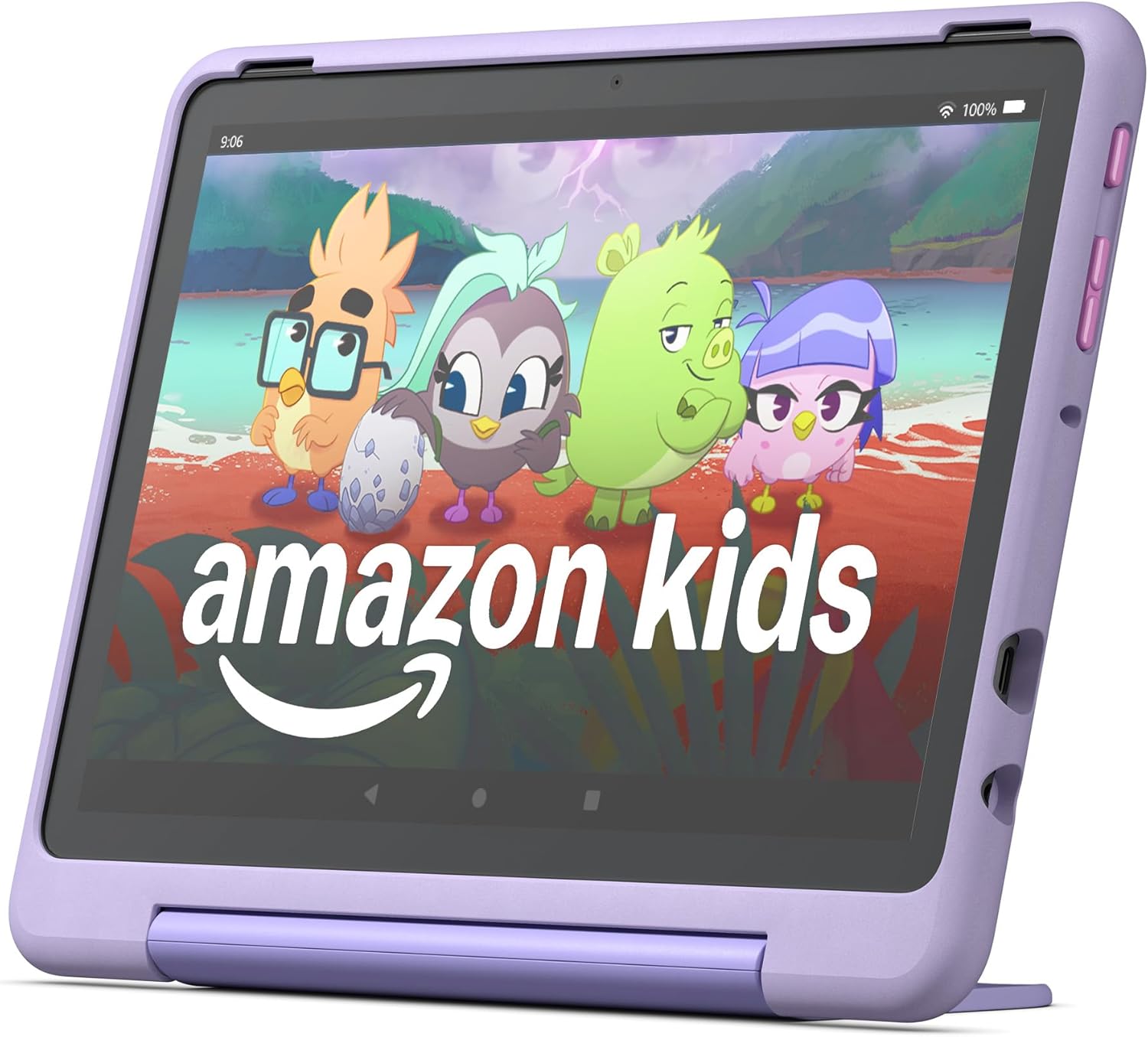
Once you reach a height of ten inches, nearly all aspects improve.Features: 10.1-inch 1080p Full HD screen, octa-core 2.0 GHz processor (25 percent quicker than last generation), 3 GB of RAM, 32 GB (microSD up to 1 TB), 13-hour battery life, thin kid-friendly case.For older students, the sleeker design is ideal, and the open-but-filtered browser allows for authentic school research while keeping parental controls in place.
The downsides include a larger weight of 23 ounces (with the case), a stuttering performance when using multiple programs, and the fact that there is still no Google Play, therefore the app selection is limited. Recommend to: children aged 6 to 12, who are prepared to move on to a larger screen inside the Amazon ecosystem. Not for families that desire complete independence on Android. Considered the best initial purchase for a child aged ten or older.
3: Samsung Galaxy Tab A11+ 5G Wi-Fi (2026)

With full access to Google Play and no child lockdown, the Galaxy Tab A11+ is the first genuine Android tablet in this region.Notable features include an 11-inch screen, 128GB of storage, an improved chipset, quad speakers, a multi-window display, Wi-Fi 6 + 5G unlocked, and an official US release in 2026.Google Play ensures that every educational program installs, and the device’s quad speakers and multi-window design make it ideal for children juggling multiple windows at once, such as YouTube, schoolwork, and video chats.
However, there are a few things to keep in mind: a separate kid-friendly shell is required for protection, setting up Google Family Link is necessary for parental controls, and Samsung has a shorter upgrade window than Apple.Suitability: children aged 8 to 12, who are comfortable enough to use unsupervised tablets. Not for: parents who prefer pre-installed, one-click security.If your family is getting set to graduate, you need an Android tablet.
4: Amazon Fire Max 11

With a larger battery and a stylus available as an add-on, Amazon’s Fire Max 11 is their full-size response.Features: 11-inch 2K display, 64GB (microSD up to 1TB), octa-core processor, 4GB of RAM, optional pen, keyboard, USB-C 3.1, optional battery life of 14 hours, 8MP cameras, and more.With its 14-hour battery life, 2K screen, and continued support for Amazon Kids+ filtered content, this tablet easily outshines all of its competitors.
Checking in with reality: 4GB of RAM is good but not best-in-class, there is no kid-proof case included, and there is still no Google Play, so the app constraints are the same as on the Fire HD 10.Those looking for the largest Fire without the childish bumper stickers can consider this option. Restrictions: not suitable for households requiring child-proof casings.Our largest Fire yet, designed to be kid-friendly without sacrificing style.
5: Apple iPad (11th Gen, A16, 2025)

The lineup really heats up now, with Apple’s entry-level iPad.Features: 128GB of storage, Wi-Fi 6, 12MP cameras, Touch ID, an A16 chip, and iPadOS 18.The entire pitch revolves around the software Store; it has every worthwhile software for kids’ learning. The iPad that starts with cartoons at age six, moves on to education at age twelve, and finally to college notes at age eighteen is the one that reviewers keep praising.
Important details: the 64GB model fills up quickly, so you can upgrade to 128GB, and there is no kid-proof case provided. There is no Apple Pencil either. Avoid if you’re a parent looking for content lockdown features or integrated bumpers.Out of all the options here, this one will endure the longest.
6: Samsung Galaxy Tab S6 Lite

For those who want to write, Samsung recommends the Galaxy Tab S6 Lite, which comes with a S Pen.Features: 10.4-inch 2K display, Exynos 1280 octa-core processor, 128GB of internal storage (microSD extendable), Android 14, the S Pen (no charger included), and an exclusive Oxford Gray color from Amazon.Samsung Notes provides actual productivity for children aged 10 and up, and the S Pen is the main selling point—handwriting for school notes works without a separate charger.
Where it falls short is in the following areas: software support is less than Apple’s, heavy multitasking slows due to the Exynos 1280’s generational gap, and the 10.4-inch screen feels smaller than other eleven-inch tablets in this space.Apt for: Students taking notes in school (grades 10 and up) with a S Pen. Those looking for the largest screen will not be satisfied.A genuine S Pen tablet for children who prefer writing to gaming.
7: Apple iPad mini (A17 Pro, 2024)

Here it is. This one I’ve chosen on my own.The following are some of the most important specifications: an A17 Pro chip (the same as in the iPhone 15 Pro), 128GB of storage, Wi-Fi 6E, 12MP cameras, Touch ID, support for the Apple Pencil Pro, and readiness for Apple Intelligence.No other iPad here achieves portability quite like the 8.3-inch body, which fits into a coat pocket, a backpack side mesh, or even the back pockets of pants. Thanks to the A17 Pro’s performance, all of your instructional apps, games, and videos will operate flawlessly for at least the next five years.
The cons include a cramped keyboard for academics compared to eleven-inch tablets, the necessity to purchase the Apple Pencil Pro separately, and the lack of a case for added security for children.Who it’s best for: families that do a lot of traveling, youngsters who aren’t too big, or anyone looking for flagship power in a little package. Use not intended for: extended academic assignments.A top-tier iPad designed for kids to use on a daily basis.
8: Apple iPad Air 11-inch (M4, 2026)

You won’t find a more powerful tablet than the Air M4.Features: 128GB of storage, 12MP cameras, Touch ID, support for Apple Pencil Pro, an 11-inch Liquid Retina display, and Apple’s laptop-grade chipset, the M4.A high school senior using this might forego buying a separate computer thanks to the M4 silicon, which turns it into a laptop substitute. For at least five more years, Wi-Fi 7 ensures it will work just fine.
Truthfully, the M4 jump shows up in benchmarks but is completely unnoticeable on kid-friendly platforms like Roblox and YouTube.
The accessory list expands quickly due to the separate sale of the Apple Pencil Pro and keyboard, and there isn’t a kid-proof case that fits this thin tablet.Ideal for: teenagers with a strong interest in design, video editing, or computer programming. Underage riders who won’t ever put a dent in the M4’s profits shouldn’t buy it.Assuming they don’t have any immediate needs, a laptop for children.
Things to Consider Before Buying a Tablets for Kid:
Targeted towards learning, purpose-built educational tablets come preloaded with age-appropriate apps and resources. Their focus on skill development makes them suitable for young learners. Features often include interactive activities and progress tracking to support both children and parents.
Standard Consumer Tablets with Parental Overlays
Standard consumer tablets can serve children effectively when equipped with parental overlays. These overlays provide customizable settings, allowing you to restrict certain content while giving your child access to safe applications. This flexibility makes it easier to balance entertainment and education.
Standard consumer tablets with parental overlays generally offer a wider range of applications compared to purpose-built versions. Features such as app blocking, screen time limits, and content filtering ensure a secure digital environment. Many popular devices come equipped with built-in parental controls, enabling you to tailor the experience as your child grows.
Educational Advantages and Skill Development
Tablets can significantly boost your child’s education by providing access to interactive learning tools, enhancing engagement, and allowing personalized learning experiences tailored to their needs.
Potential Risks of Excessive Screen Exposure
Overexposure to screens can lead to various health issues, including impaired vision, sleep disturbances, and reduced physical activity. Balancing screen time is vital to mitigate these risks.
Excessive screen exposure also contributes to declining attention spans and impacts social skills, as children may become reliant on digital devices for interaction. Setting clear boundaries around screen time encourages healthier habits, allowing for vital physical activity and face-to-face communication. Continuous monitoring and thoughtful engagement can help your child benefit from digital tools while minimizing potential drawbacks.
Establishing Clear Usage Boundaries
Creating specific times for tablet use helps manage expectations. Define distinct periods for screen time and encourage breaks to prevent overuse. Communicating these rules ensures your child understands and respects the limits.
Monitoring Content and Online Interactions
Vigilance is important in managing your child’s online presence. Regularly review the apps and websites accessed, ensuring age-appropriate content. Open discussions about online interactions help your child navigate potential risks.
Monitoring content and interactions requires ongoing engagement. Regular check-ins about your child’s online experiences promote transparency and trust. Use parental controls and guidelines to filter content effectively while reinforcing safe practices. Encourage open dialogue about any concerns or troubling encounters, ensuring your child can report issues without fear. This proactive approach protects your child while fostering digital literacy.
Balancing Upfront Costs with Long-Term Utility
Assessing upfront costs against long-term benefits is vital. Investing in a tablet that may be pricier initially could save you money in the long run if it offers durability, more features, or superior performance. Think about how the device will meet your child’s educational and entertainment needs over time.
Evaluating Subscription Services vs. Free Content
Analyzing the benefits of subscription services versus free content is crucial for maximizing value. Subscription services often provide more comprehensive and organized content, along with regular updates, while free options may lack quality and security. Consider which option aligns better with your child’s learning style and your budget.
Subscription services can enhance your child’s experience by offering structured learning and varied content that evolves over time. While they come with ongoing costs, these platforms typically provide additional resources, parental controls, and an ad-free environment, making them appealing options for dedicated learning. Evaluate how these benefits justify the subscription fee against the reliability of free content.
Summing up
Following this guide ensures you make an informed choice when purchasing a tablet for your child. Consider durability, age-appropriate content, educational features, and parental controls. These factors collectively enhance your child’s learning experience while keeping them safe in the digital environment.
Leave a Reply