
Finding the best PS5 SSDs is the ultimate way to expand your game library and crush frustratingly long load times. Are you tired of deleting your favorite titles just to make room for new ones? Upgrading your internal storage is the key to unlocking seamless, lightning-fast gameplay. We’ve rigorously tested the top drives for speed and reliability to bring you the definitive list. Let’s dive into the models that will transform your console experience.
Top 5 PS5 SSDs:
1. Samsung 990 PRO w/ Heatsink – Best PS5 SSD Overall

Samsung 990 PRO w/ Heatsink It’s not the cheapest, but if you want your PS5 to feel like it just got a permanent speed boost, Samsung 990 Pro with heatsink is where it’s at. You’re getting a 2TB Gen 4 powerhouse that cuts load times, speeds up fast-travel and stores your favorite new worlds for you to play whenever. The built-in heatsink isn’t just all for show; it’s the perfect complement to the rest of the hardware, ensuring that temperatures remain low and performance stays high during those late-night raids, party marathons and campaign sessions.
You care about space? Install it once and never Tetris with your library again. Big hits, chunky patches and the indie gems you swear (swear) you’ll get to — there’s room for all of it. You care about speed? The 990 PRO not only employs bandwidth to keep its travel moves easily but also stutters and sluggishness as well.
Installation is a breeze: Slide it in, format and you’re gaming again before your snack hits the microwave buzzer. And if you move back and forth between platforms, then you’ll appreciate that this internal SSD is not only friends with PCs but also more, ensuring your performance upgrade doesn’t stop at the console.
You’re after wins that, like, feel faster — shorter loads, cooler runs, smoother sessions. The 990 PRO w/ Heatsink just continues to push the limit, advancing performance throughout your game or work experience and pushing the threshold game after game, chapter after chapter.
2. Seagate FireCuda 530 w/ Heatsink – Best Endurance & Reliability PS5 SSD
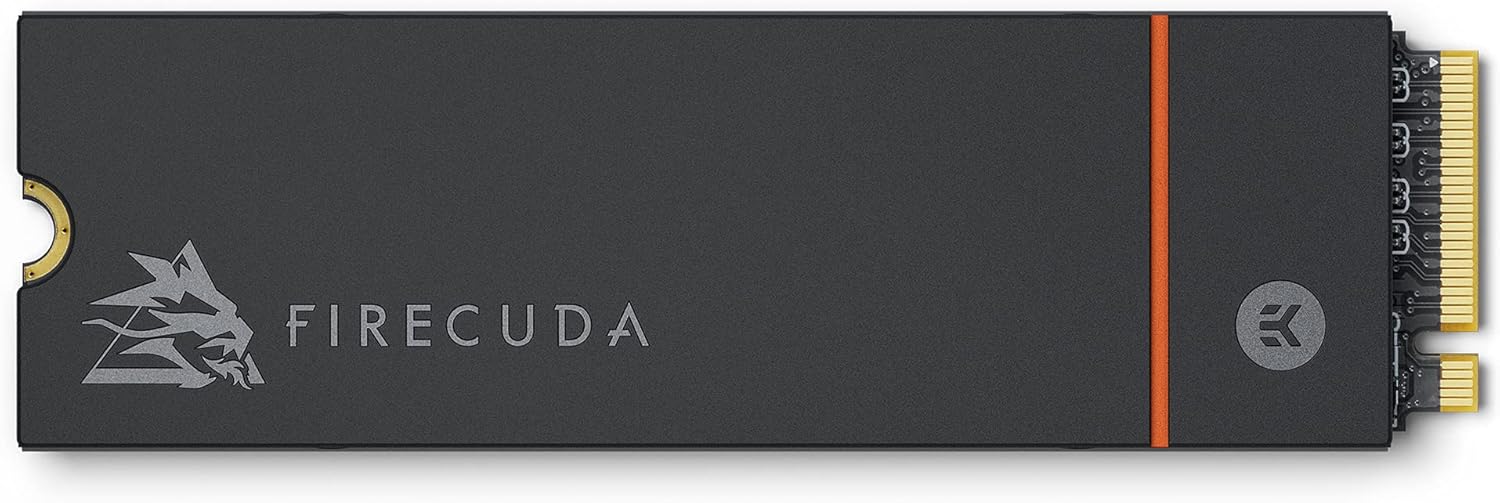
Guardar If you’re looking for a PS5 upgrade that doesn’t care about long campaigns and constant patches, the Seagate FireCuda 530 w/ Heatsink is your endurance champ. Built for the grind, it is enclosed in an advanced industrial housing that provides added strength and improves cooling efficiency while dissipating heat throughout its body to ensure uninterrupted transfers. You get breathtaking PCIe Gen4 speed that as high as 7,300MB/s – so the loading screens pop up less often and the fast travel’s all fast, and you can start playing incredibly quickly when everyone else is still “loading.”
That pre-installed heatsink is more than just for show: It helps reduce thermal throttling, ensuring stable performance throughout marathons and large transfers. Translation: your drive stays cool when the action heats up. And when reliability counts as much as speed, FireCuda 530 has you covered with ferocious durability to go along with its advanced NAND and meticulous engineering for a drive built for the long run.
It’s easy to install, and once it is installed, you’ll immediately notice the improvement across the board from snappier menus in games to faster asset streaming when traveling through open world environments. Whether you’re dodging huge patches, recording 4K clips or stacking AAA installs, this is “The Best Endurance & Reliability PS5 SSD” because it allows you to say yes to more games with less downside.
Fast. Consistent. Battle-tested. The Seagate FireCuda 530 w/ Heatsink supercharges your console into a performance beast, so you didn’t just win the game; you became unstoppable.
3. Seagate Game Drive – Best External PS5 SSD

If your PS5 is behaving like a child refusing to tidy up, throwing tantrums over “not enough space,” the Seagate Game Drive is your calm, plug-in comeback. You get a roomy 2TB in a sleek, pocket-size 2.5-inch body that’s easy to slide into your setup sans tools, drama or dust. Simply connect with USB 3.0, an easy plug-and-play operation (no screwdriver or software is needed), and you’re good to go!
it’s been optimized for the PS5 both Digital Edition and Standard models, this drive plays nice with your console right off the bat. The discreet LED indicator shows whether your M8 SE is working, and the custom heatsink reduces thermal throttling to maintain consistent performance during those long gaming marathons.
Because under the hood lies all-out performance—up to 7,300 MB/s read and 6,000 MB/s write unleashed by PCIe Gen4 muscle —so you can move giant files and game packs at breakneck speed instead of fallback snail pace. Combine that with the accessibility of USB and the backup potential in this portable drive is incredible. Road trip, friend’s house, living room couch — your library goes with you.
And because real life happens, Seagate’s Rescue Data Recovery Services provide a convenient safe place for all your files in the event of a life disaster, natural or otherwise.
More room, cooler heads and fewer hard choices about what to keep. With the Seagate Game Drive, you can have your game library and all of your other content at hand no matter where you go; specially built for PS4 consoles, so that you can bring a world of games to every room in your house. Plug in, turn on and let the downloading begin.
4. WD Black SN850P – Best High Capacity PS5 SSD

If you’re over having to decide which favorite to delete next, the WD_BLACK SN850P is your high-capacity lifeline. It’s official Whether you’re just starting out and desperate to show off your skills, a seasoned pro chasing the next win or looking for a seamless gaming experience, the Stealth 600 Gen 2 is fully compatible with PlayStation offering an all encompassing wireless experience Designed for play on PS5 consoles traveling easily from room to room Continuing your mission of dominance Also available in black or White; designed with players in mind, comfort features include ProSpecs glasses friendly design that removes pressure on your glasses while you play Superhuman hearing sound setting gives you a competitive advantage Work on your game with hours of wireless gaming.
At that capacious 2TB, all the heavy hitters can stay installed — the story epics, your multiplayer mains and that indie backlog you keep swearing you’ll start this weekend. Just play from the drive and skip the transfer process. It’s tested and certified for PS5, so you’ll spend less time fussing and more time winning.
Speed? You’re covered. Take your PCIe Gen4 performance to the next level with read speeds of up to 7,300MB/s — almost 45x faster than traditional HDDs, it’s a new level of speed.[1] Load large files and games in record time or make them a thing of the past with more space than you’ll know what to do with. So whether you’re getting lost in open worlds or moving from match to match, responsiveness is crazy fast.
Installation is simple, the look black and streamlined, the payoff immediate: smoother sessions, shorter waits and a library that once again feels like your own. If you’re after big storage with few (big) compromises, the WD_BLACK SN850P—Best High Capacity PS5 SSD—lets you say “yes” to more games and “no” to removing them. Just plug in, power up and keep playing.
5. Lexar NM790 Heatsink – Best Budget PS5 SSD

If you’re tired of playing “which game to delete today” the Lexar NM790 Heatsink is your fresh start. The 1TB rocket delivers read and write of up to 7400MB/s and 6500MB/s menus are slick, levels load, your game just so much faster liking the beast that it is. The included heatsink keeps everything cool under pressure, so your rig won’t become a space heater—or force you to tinker with fan curves.
You like options? You’ve got them. Utilize it in a desktop, slot it into a laptop or enable your PlayStation 5 the storage headroom that it needs. Installation is pretty simple, and once it’s done you’ll wonder why you waited. The big old open world installs, chunky patches and weekly updates no longer sound like a faff. You just play.
Why it is the “Best Budget PS5 SSD”? You get premium-tier speed and thermals but not the premium-tier drama. It’s designed for real life — late-night raids, weekend marathons and that “one quick match” that turns into five. More time to play stop searching for a good place to leave your console4; the NM790 heatsink is where you want to keep it so you spend more time here and less time there stacking up wins, trophies, memories and screens that actually make you happy.
So download the big games, keep the classics and say yes to the next must-play. Your console stays cool, load screens are short and you say goodby to storage stress. The Lexar NM790 Heatsink doesn’t just make room, it unleashes momentum. Plug in, power on and play.
Things to Consider Before Buying a PS5 SSD:
You should prioritize compatibility with the PS5’s M.2 NVMe PCIe Gen4 interface, minimum sequential read speeds (Sony recommends 5,500 MB/s), proper physical size and heatsink clearance, and sufficient capacity for your library; also weigh endurance (TBW), warranty, and reliable brand reviews to ensure consistent performance and thermal management inside your console. Assess cost per GB and future expandability so your upgrade delivers the best balance of speed, longevity, and value.
NVMe SSDs
You should pick PCIe Gen4 x4 NVMe drives when you want true PS5 performance; Sony’s recommended minimum is about 5,500 MB/s sequential read, and drives like the WD Black SN850 or Seagate FireCuda 530 hit 7,000–7,300 MB/s, shaving seconds off load and streaming heavy assets—just confirm M.2 length, install a low-profile heatsink, and update PS5 system software before use.
SATA SSDs
You’ll find SATA SSDs deliver around 500–600 MB/s sequential reads, making them cost-effective for storing PS4 libraries, media, and backups; because the PS5’s internal slot requires NVMe PCIe, you must connect SATA drives externally over USB for play or transfer, and models like the Samsung 870 EVO and Crucial MX500 remain dependable cheaper options.
On cost and practicality, SATA wins for bulk storage: typical prices run per GB versus NVMe’s per GB, so if you need large capacity for older-gen titles or media you’ll pay much less, and using a USB 3.2 Gen2 enclosure (10 Gbps) will get you the most out of a SATA external drive.
Storage Capacity
You should match capacity to your library: 500GB fits a few AAA titles, 1TB holds roughly 8–16 games (many range 50–120GB), while 2TB–4TB suits heavy collectors. Picking 1TB gives a balance of cost and convenience, but if you install several open-world games simultaneously, you’ll appreciate 2TB or larger to avoid frequent deletions.
Read and Write Speeds
You want sequential read speeds of 5,500 MB/s or higher to meet PS5 requirements; drives like the WD SN850 and Samsung 980 Pro hit ~7,000 MB/s, and Seagate FireCuda 530 reaches ~7,300 MB/s. Also check sustained write rates and cache behavior, since large installs and patching rely on consistent throughput rather than peak bursts.
Digging deeper, you’ll notice peak sequential numbers don’t tell the whole story: sustained write performance, NAND type (TLC/3D), controller efficiency, and DRAM/cache presence determine real-world installs and load consistency. For example, a drive with high peak reads but weak sustained writes can slow large file moves; prioritize drives with strong TBW ratings and positive real-world benchmarks for gaming workloads.
Advantages of Adding an SSD
You’ll see tangible benefits: PS5 supports PCIe Gen4 x4 drives with ~5,500 MB/s reads, and adding a 1–2TB NVMe cuts many load and install times by roughly 30–70% compared with USB or older drives. Games with large open worlds stream assets smoother, reducing texture pop-in and faster scene swaps. For daily play, this means less waiting for updates and quicker session starts when you juggle multiple AAA titles on your console.
Potential Drawbacks
You may face trade-offs: compatible NVMe modules and quality heatsinks raise costs, and cheaper drives often have lower TBW (endurance) ratings that shorten lifespan under heavy installs. In practice, some titles won’t show dramatic gains because they’re already optimized for the PS5’s internal SSD, so your real-world improvement can vary by game and usage patterns.
On a deeper level, thermal management and compatibility cause most issues: drives that lack proper cooling can thermal-throttle below advertised speeds, and Sony’s slot limits you to 2280 sizes and up to 4TB. If you pick a budget drive with, for example, 300–600 TBW on a 1TB model, heavy seasonal re-installs and constant rewriting will wear it faster than premium options that advertise higher TBW and better sustained throughput.
Compatibility
You must use an M.2 NVMe PCIe Gen4 x4 SSD; SATA or PCIe Gen3 drives won’t meet Sony’s expansion requirements. The console expects sequential read performance near 5,500 MB/s to match native drive speeds, and supports M.2 sizes from 2230 up to 22110—most gamers go with 2280. Also confirm total stack height (SSD plus heatsink) fits your PS5’s expansion slot and that the drive’s firmware is up to date to avoid recognition issues.
Brand Recommendations
You’ll get reliable performance from Samsung (980 Pro, 990 Pro), Western Digital Black (SN850/SN850X), Seagate FireCuda 530, Sabrent Rocket 4 Plus, or Corsair MP600 Pro; many of these list sustained reads well above 5,500 MB/s—Samsung 990 Pro and WD SN850X approach 7,300–7,450 MB/s, while FireCuda 530 advertises up to ~7,300 MB/s. Pick models with proven thermal solutions or buy compatible low-profile heatsinks.
Look at endurance and real-world sustained performance: FireCuda 530 is known for high TBW and sustained write stability, Samsung firmware often delivers strong IO consistency, and WD balances price/performance. You should weigh warranty (3–5 years typical), bundled heatsinks, and community benchmarks showing sustained loading times in PS5 games—bench tests often reveal how drives behave under long install/write sessions, which matters more than peak MB/s alone.
Installing the SSD
Begin by removing the M.2 slot screw and spacer, insert the SSD at a shallow angle into the slot, press it down onto the standoff, secure with the screw, and ensure any heatsink stays within the console’s clearance before replacing the cover.
After seating the drive, double-check physical clearances—Sony supports M.2 lengths up to 110mm (2230–22110) and prefers PCIe Gen4 x4 NVMe SSDs; if the PS5 fails to detect the module, reseat the drive, confirm standoff alignment, and try again after updating system software or SSD firmware on a PC.
Troubleshooting Common Issues
If your PS5 SSD behaves oddly, start by checking that the drive meets Sony’s specs — PCIe Gen4 x4 NVMe, recommended sequential read ~5,500 MB/s, and an appropriate M.2 length (2230–22110, 2280 preferred). You should confirm PS5 system software is up to date, ensure the heatsink doesn’t exceed slot clearance, and use the console’s storage utility to format or rebuild the database; many problems trace back to seating, thermal, or firmware mismatches.
Performance Problems
Thermal throttling often causes the biggest slowdowns: an SSD rated 7,000 MB/s can drop under 1,000 MB/s during sustained writes if airflow or heatsinking is inadequate. You can mitigate this by installing a low-profile heatsink, avoiding cramped enclosures, keeping background downloads paused, and placing frequently played titles on the fastest internal storage to reduce in-game stutter.
Installation Errors
Common installation failures arise when the module isn’t fully seated, the heatsink is too thick for the PS5 cover, or the M.2 screw isn’t secured properly; the console may report the drive as unsupported if it detects a SATA or PCIe Gen3 device. You should inspect physical fit first, then run the PS5 compatibility check during setup and format the drive when prompted.
For deeper troubleshooting, verify the SSD is NVMe PCIe Gen4 x4 and within 2230–22110 lengths (2280 ideal), remove aftermarket heatsinks that exceed the slot’s clearance (many PS5 users resolve errors by swapping to a thinner 2–3 mm heatsink), update your PS5 to the latest firmware, and try re-seating the module using the official screw; if the console still rejects the drive after these steps, test the SSD in a PC to check SMART/TBW health or contact the SSD vendor for a firmware update.
Conclusion
Drawing together the technical specs, compatibility, thermal management, warranty, and budget helps you choose an SSD that delivers the speed, capacity, and reliability your PS5 needs while fitting your installation and long-term upgrade plans.
Leave a Reply