
Finding the best gaming headsets 2026 shouldn’t feel like a chore. Are you tired of bulky gear that hurts your ears during long sessions? To dominate every match, you need crystal-clear spatial audio and a premium noise-canceling microphone. We’ve tested the latest wireless gear to ensure you experience breathtaking, immersive soundscapes that put you right in the action. Ready to upgrade your setup? Let’s explore the top picks that will revolutionize your gaming world.
Top 8 Gaming Headsets 2026:
1. HyperX Cloud Stinger 2

275 grams, 50 mm drivers, swivel-to-mute mic, memory foam cushions, and compatibility with PC, PS4, Xbox One, Switch, and mobile devices via 3.5 mm cable connection. DTS Headphone:X Spatial Audio for PC is included.
At thirty dollars, you get good sound quality—good spatial sound in games—and the memory foam stays comfortable for two hours of use. For group communication, the microphone is free.Now, here’s what they leave out: the plastic construction bends as you tweak it, the cord stays in, and the microphone picks up ambient noise. Not deal-breakers, but it’s good to be aware.
Great for cheap gaming on consoles, students on a budget, or anyone in need of a portable headset. If you’re a rough streamer, live in a noisy area, or have pets that gnaw on cables, you might want to pass.
2. SteelSeries Arctis Nova 1

Features an aluminum frame, a detachable 3.5mm cable, a ClearCast Gen 2 microphone, a weight of 236 grams, a ski-goggle suspension, and compatibility with all platforms.This is the lightest headset on our list, yet it has all the features you could want: a sturdy aluminum frame, high-quality spatial audio (great for competitive shooters), and a removable cable for easy replacement. You won’t believe how great the mic is.
An examination of reality reveals that the plastic adjustment mechanism may break after 12 to 18 months, that the mic boom cannot be detached, and that the bass response is inadequate for musical purposes.
If you’re a competitive gamer in need of spatial audio, a multi-platform player who values detachable cords, or a comfort-focused gamer who wants an extremely lightweight feel, these headphones are for you. If you’re concerned about the product’s longevity, desire a removable microphone, or are a basshead, you might want to look elsewhere.
3. HyperX Cloud III

Headphones with 53 mm angled drivers, three-pronged connection (USB-C, USB-A, and 3.5 mm), DTS Headphone:X Spatial Audio (USB only), a detachable 10-millimeter boom mic, an aluminum frame, memory foam pads, and a weight of 308 grams.Clear directional audio in first-person shooter games, broadcast-grade microphones, and three-pronged connectivity make this wired headset an excellent value for less than seventy dollars. The frame made of aluminum seems sturdy.
Problems include a lack of wireless connectivity, a tight clamping force right out of the box, and the fact that spatial audio is only compatible with USB, meaning that 3.5mm mode is only available in stereo.
Ideal for streamers in search of a high-quality microphone, gamers on PC and consoles looking for a premium wired experience for less than, and anyone else who prioritizes longevity. Not a good fit for those who play exclusively wirelessly, Switch owners who require spatial audio beyond 3.5 mm, or those with bigger heads.
4. HyperX Cloud Alpha Wireless

310 grams, DTS Headphone:X, detachable mic, 2.4GHz wireless dongle (no Bluetooth), dual-chamber 50mm drivers, and an astonishing 300-hour battery life.In 2026, I will personally choose this. Just plug it in once and put it away for a few weeks. The sturdy construction, superior battery life, and bass isolation provided by the dual-chamber drivers make these headphones an affordable alternative to high-end models that cost twice as much.
But seriously, it’s heavier than inexpensive models (albeit still comfy) and doesn’t support Xbox or Bluetooth for phone use (310 grams).This is the ideal wireless headset for PC or PS gamers who are sick of charging their devices often, for those who play for long periods of time, or for competitive players who require a stable connection. Those who play Xbox, require Bluetooth for multitasking, or are looking for the lightest headset should skip this.
Could you please tell me your maximum budget? Just let me know in the comments and I’ll give you my recommendation. Give it a like if it’s useful!
5. SteelSeries Arctis Nova 7 Gen 2
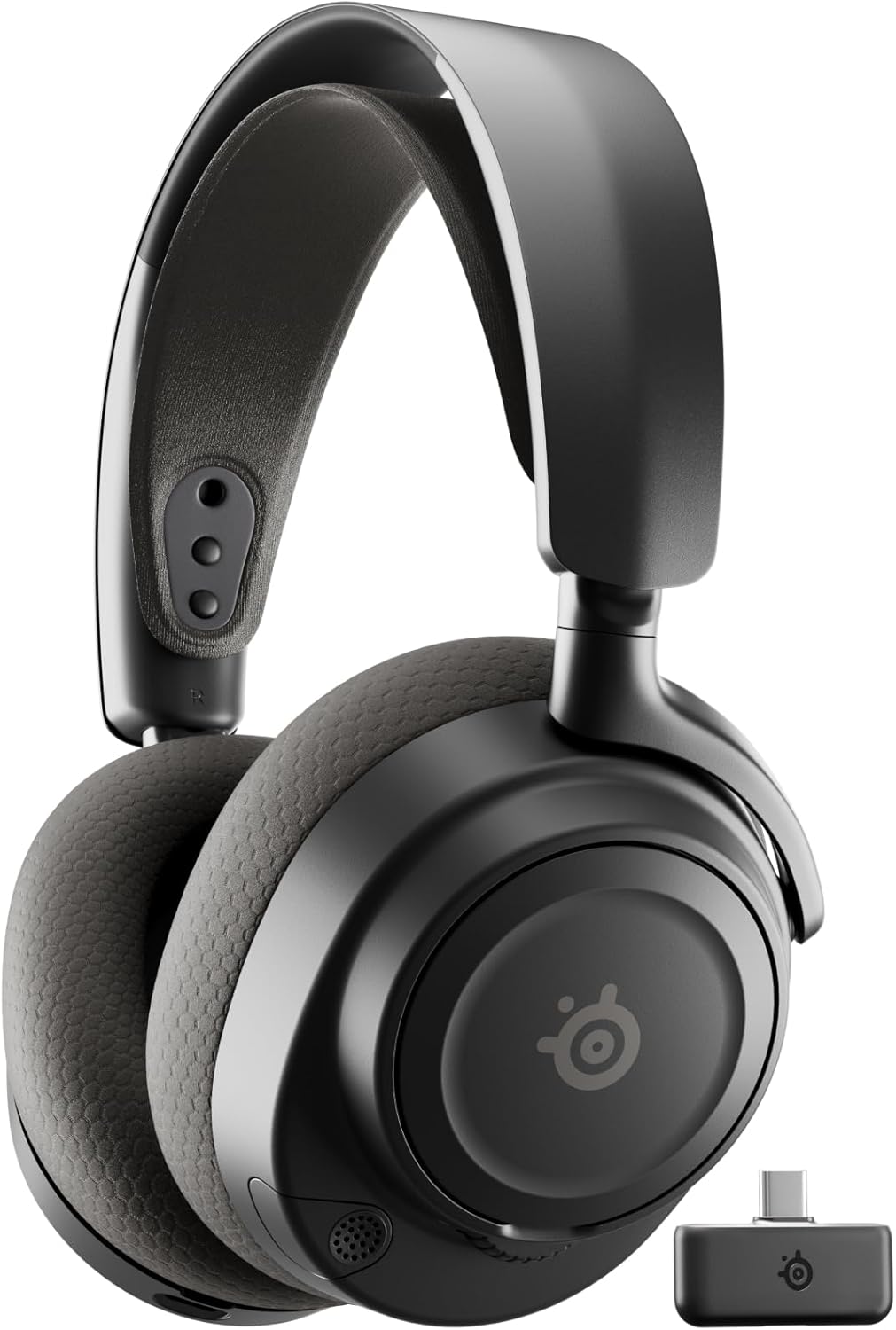
has 40mm neodymium drivers, 2.4GHz wireless + Bluetooth 5.3, a 54-hour fast-charge battery, a retractable ClearCast microphone, Sonar multidimensional audio, and is controlled by a mobile app. It weighs 312 grams.The retractable mic vanishes when not in use, the mobile app allows for real-time EQ tweaking, and you can blend game audio via 2.4GHz and Discord over Bluetooth at the same time—all of which are streamers’ dreams come true. Elevated level of comfort.
The second generation still has the same problem with the SteelSeries headband splitting, it doesn’t work with Xbox wirelessly, and the sound is decent but not top-notch.
Ideal for gamers who switch between PC and PlayStation, streamers who mix in game audio with phone audio, or anyone who appreciates EQ set by an app. Those that utilize Xbox wireless, are picky about their audio, or are on a tight budget shouldn’t buy this headband.
6. Razer BlackShark V3 Pro

Featuring 50mm TriForce speakers, 77% attenuation Hybrid Active Noise Cancellation, a HyperClear mic operating at 32kHz, four modes of connectivity (2.4GHz, Bluetooth, USB-C, 3.5mm), and only 325 grams, these headphones are ideal for long-term use.With an efficacy rate of 77%, the ANC effectively muffles background noise, making it ideal for gamers who like to play in busy environments. The four available connections provide you the most freedom of movement, the battery life is long, and the mic quality is broadcast quality.
Things that will remain unspoken: If active noise cancellation (ANC) isn’t absolutely necessary, the Razer Synapse program breaks frequently, the ANC makes you feel slightly pressured, and you’ll have a hard time competing with planar magnetic headsets.
Perfect for those hard-to-hear places where active noise cancellation is a must, for those making audio for broadcast purposes, or for those using a variety of devices and seeking portability. Stay away if you’ve had issues with Razer software, are easily irritated by ANC pressure, or would prefer high-quality sound over noise cancellation.
7. Audeze Maxwell

80 hours of battery life, 2.4GHz, Bluetooth, USB-C, 3.5mm, LDAC support, AI microphone, Dolby Atmos, 490 grams, 90mm planar magnetic speakers, and a frequency response of 10Hz to 50kHz are all on the list.With their 80-hour battery life and planar magnetic drivers, these headphones provide sound quality that is leagues beyond the competition. You’ll be able to hear footsteps from three buildings away, yet charging them less frequently than once a month is a breeze. Technology of this caliber is reserved for audiophiles.
Warning: this is the heaviest headset here at 490 grams, so you might start to notice it after two hours of use. Additionally, there have been reports of low-volume QC difficulties with some units, and customer service from Audeze has been delayed.
Designed for individuals who value high-quality sound, competitive first-person shooters who want to hear every sound cue, or anyone looking for audio for the endgame. If you’re worried about neck pain from lengthy sessions, purchasers who are risk averse about QC, or budget-conscious gamers, the Cloud Alpha Wireless is a better option.
8. Logitech G Astro A50 X

Features include 40mm PRO-G graphene drivers, a charging dock, a 24-hour battery, 2.4GHz + Bluetooth, Dolby Atmos, and a PLAYSYNC HDMI 2.1 base station with automatic console switching.The most high-end configuration for multiple consoles currently available, with features like PLAYSYNC, an HDMI 2.1 base that supports 4K 120Hz, and a charging dock that allows you to simply set it down to charge. This is the perfect solution for those who possess multiple consoles.
In all candor, if you only have one platform, the price tag is steep, the 24-hour battery life is lacking in comparison to alternatives with 300-hour batteries, and the base station makes it less portable.
Ideal for premium customers who appreciate the ease of a charging dock, home theater fans who need an HDMI hub, and multi-console owners who are sick of switching headsets. If you’re just going to be playing games on one platform, value battery life highly, or require a portable device, skip this.Now that you’ve watched all eight, it’s time to announce the winners.
Things to Consider Before Buying a Gaming Headsets 2026:
This guide highlights key factors to evaluate when purchasing gaming headsets in 2026. Understanding sound quality, comfort, compatibility, and features will enhance your gaming experience. Make informed choices to find the perfect headset tailored to your gaming needs.
High-Fidelity Wired vs. Ultra-Low Latency Wireless
Wired headsets typically deliver superior audio quality with high fidelity. They ensure zero lag, which is vital for competitive gaming. In contrast, ultra-low latency wireless headsets have improved significantly, offering a balance between freedom of movement and sound performance. Evaluating your priorities will guide your choice.
Specialized Haptic Feedback and VR-Integrated Models
Specialized haptic feedback headsets enhance immersion by providing tactile sensations in response to in-game actions. These models often integrate seamlessly with VR systems, creating a more lifelike experience. Environments and actions feel more realistic, drawing you deeper into the game world. Enhanced sensations, such as vibrations for explosions or directional cues, transform gameplay in unique ways. The combination of haptic feedback and virtual reality amplifies immersion, stimulating both auditory and physical responses. Choose models that match your gaming preferences for a fully engaging experience.
Driver Diameter and Frequency Response Range
Driver diameter impacts audio output quality. A larger driver generally provides enhanced bass and overall sound clarity. Frequency response range indicates how low and high frequencies are handled, ensuring a balanced audio experience.
Spatial Audio Standards and 3D Soundstage Precision
Spatial audio standards facilitate immersive experiences. These technologies create depth and realism in sound, allowing you to detect where sounds originate. Consider headsets that incorporate these standards for a competitive edge in gaming.
Seek headsets that utilize advanced spatial audio technology for enhanced positioning accuracy. Implementing 3D soundstage precision allows you to detect subtle audio cues and their directional origins, which can provide a significant advantage during gameplay. This ensures you don’t miss any critical audio signals, enhancing overall immersion and responsiveness in fast-paced scenarios.
Open-Back vs. Closed-Back Sound Isolation
Open-back headphones allow ambient noise in, creating a spacious sound experience but sacrificing isolation. Closed-back headphones block external sounds, making them suitable for competitive gaming in noisy environments. Consider your gaming context to choose the right isolation type, emphasizing your experience over preferences.
On-Ear vs. Over-Ear Ergonomic Trade-offs
On-ear headphones can feel lighter and more portable, yet they may cause discomfort over lengthy sessions. Over-ear models provide fuller coverage and often improve comfort but can be bulkier. Assess your preferences for fit and comfort to maximize your gaming experience.
Choosing between on-ear and over-ear designs hinges on your comfort levels during extended gameplay. On-ear headphones typically apply pressure to the ears, potentially leading to discomfort after a few hours, but are more compact. Over-ear headphones completely encase the ears, distributing weight more evenly and usually providing better acoustic performance, ideal for longer sessions without fatigue.
Synchronizing Multi-Platform Connectivity
Verify compatibility with multiple devices, including consoles and PCs. Switch between platforms easily by ensuring your headset supports various connection methods like Bluetooth or USB. This strategy enhances your gaming experience across different systems.
Optimizing Software EQ and Microphone Sensitivity
Adjust equalizer settings to tailor sound to your preference while refining microphone sensitivity for clear communication. Properly calibrated audio enhances immersion, allowing for a more enjoyable gaming experience.
Fine-tuning your headset’s software EQ can significantly change the sound profile to match the type of games you play. Adjusting microphone sensitivity can eliminate background noise and improve voice clarity, ensuring teammates hear you loud and clear. Explore various settings and profiles to find the perfect balance for your unique gaming environment.
Weight Distribution and Headband Tension
Effective weight distribution is imperative for prolonged gaming sessions. Headbands that provide appropriate tension help prevent discomfort and fatigue. Finding a balance between snugness and comfort ensures that your headset remains stable without causing strain over time.
Cooling Gel Technology and Earpad Material Durability
Investing in headsets featuring cooling gel technology can enhance your comfort during extended gameplay. Durable materials in earpads also contribute to a headset’s longevity, ensuring consistent performance and comfort throughout its lifespan.
Cooling gel technology offers superior thermal regulation, helping to maintain a comfortable temperature during long gaming sessions. Durable earpad materials, coupled with this innovation, reduce wear and tear from sweat and prolonged use. Selecting headsets designed with these features ensures they remain comfortable and effective over time, preventing discomfort that can distract from gameplay.
Battery Health Management for Wireless Units
Wireless units demand special care for battery longevity. Charge your headset regularly, but avoid overcharging by unplugging once fully charged. Try using the battery in regular intervals instead of storing it for long periods, as this can help preserve battery life.
Maintenance Protocols for Replaceable Components
Replaceable components, like ear cushions and cables, directly impact performance. Regularly check for wear and replace them as needed to maintain sound quality and comfort. Following manufacturer guidelines on replacement intervals can save you future expenses.
Replacing components not only ensures optimal performance but also enhances your overall experience. Utilize manufacturer websites for exact replacement parts and timing recommendations. Prioritize keeping spare parts on hand to swiftly address wear and maintain your headset’s functionality without interruption.
Conclusion
So, when selecting a gaming headset in 2026, consider sound quality, comfort, compatibility with your devices, and budget. Evaluate whether features like wireless connectivity and noise cancellation align with your gaming style. Making informed choices guarantees an enhanced gaming experience tailored to your needs.
Leave a Reply