
Finding the best digital photo frames can feel overwhelming when screens vary in image quality, setup, and sharing features. This guide cuts through the noise to help you choose a frame that makes your favorite photos look vivid and keeps loved ones close, wherever they are. We compare top picks for simple setup, crisp displays, and easy photo sharing, so you can find the right fit. Let’s explore the frames worth bringing home.
Top 8 Digital Photo Frames:
1: AEEZO Digital Picture Frame 10.1″

To start, the AEEZO demonstrates that budget frames don’t need to be understated.Specifications include an IPS display, auto-rotate functionality, 32 GB of internal storage, a light sensor, and the AiMOR software with multi-user sharing. The screen resolution is 1280 x 800.Customers rave about the screen’s automatic nighttime dimming and how quickly family members can connect and share images from any location.
On the downside, the plastic construction looks cheap in comparison to name-brand frames; close-up shots don’t do justice to the 1280 x 800 resolution; and without adjusting the aspect ratio in the app, the 16:10 screen will crop your phone images.When looking for a basic touchscreen frame, this is the best option for first-time gift givers. This is not the right choice for: those looking for a decorative frame.Everything you need, but none of the frills.
2: BIGASUO 64GB 15.6″ Frameo Digital Picture Frame

Would you like a larger screen without going over your budget? Here we have the leap.Essential features include a 15.6-inch Full HD IPS touchscreen, a resolution of 1920 x 1080, 64GB of storage space, the ability to expand by SD and USB, the Frameo software, and the ability to play videos with sound.Reviewers highlight the larger screen as an improvement, and the Reply function allows grandparents to directly respond with a thank-you.
The downsides include a less well-known brand for long-term support, the fact that most phone images have their top and bottom corners cropped by the 16:9 widescreen, and the fact that features like cloud backup require an optional subscription.Perfect for: large families who want a screen big enough to use as a TV in the living room. People who value the reputation of brands should not buy this.Undoubtedly the largest screen in Tier 1.
3: Skylight Digital Picture Frame 10″

Your parents will never have to download an app again with Skylight, which eliminates the largest gift-giving dilemma.Impressive features include a 10-inch touchscreen, a resolution of 1280 x 800, a one-of-a-kind email address for the frame, the ability to upload images through app or email, cloud storage, and the ability to load photos before giving as a gift.Users may easily set it up by plugging it in, connecting it to Wi-Fi, and then sending images to loved ones from any device via email.
The glossy screen is fingerprint and glare magnets, you can’t save images offline, and the Plus plan is required to play videos and post to the web.Perfect for: those looking to purchase a present for parents who have difficulty navigating mobile devices and applications. Avoid: households where members frequently share video clips.This is the most user-friendly arrangement for grandparents who aren’t tech-savvy.
4: Aura Carver 10″ Digital Picture Frame

Designed and built like Aura’s high-end frames, the Carver has all the hallmarks of an entry-level model.A few important features include a 10.1-inch high-definition display with a resolution of 1280 x 800, unlimited free cloud storage, a portrait matching feature called Photo Match, auto-dimming, and the ability to preload photographs before they are given as a gift.Reviewers love how Photo Match effortlessly crops two portraits into one seamless photo without requiring a subscription.
Important details: it can only be used in landscape mode, has no touchscreen but a top-mounted swipe bar, lacks local storage, and turns black when Wi-Fi isn’t connected.Customers looking for a high-quality frame without any recurring costs might consider this option. Not recommended for: houses with spotty Wi-Fi.Polish of the highest quality without the price tag.
5: Aura Aspen 12″ Digital Picture Frame

At this point, the images begin to take on the appearance of prints rather than screen captures.Featured specifications: auto-dimming, 12-inch screen, 1600 x 1200 resolution, 170 ppi, portrait or landscape orientation, and free unlimited storage.According to evaluations, the density is the best part. Even at an inch or two away, details like hair and fabric stay put. You may avoid fingerprints and other screen smudges by using the touch bars.
There isn’t a way to put it on the wall, everything is stored in the cloud, so if the Wi-Fi goes out, the picture will be blank, and those who are overly enthusiastic about tapping will need some practice with the swipe bars.Ideal for: those looking to impress with a sophisticated tabletop frame as a present. Do not attempt to attach it to a wall.This is the clearest image of the bunch.
6: Skylight Digital Picture Frame 15″

Would you like a larger screen with your Skylight 10? Despite appearances, the 15-inch model isn’t an enhancement.Features: 15-inch touchscreen, one-of-a-kind email address for the frame, ability to upload by app or email, storage in the cloud, and the ability to load photographs prior to gifting.It maintains the straightforward design that has made the 10-inch a hit with grandmas. Customers love the larger glass because it lets more light in, but it’s really just the same thing magnified.
The bigger glossy screen shows significantly more glare, the truth is that video and online uploads remain restricted behind the expensive Plus plan, and pixel density trails the Aura Aspen.The ideal choice for lovers of Skylight who require a larger screen for individuals with low vision. If you’re looking to compare the sharpness of images, this is not the right place.Larger, but without improvement.
7: Dragon Touch 32″ Large Digital Picture Frame

The frames are now ready to be transformed into wall art, beginning with the 32-inch size from Dragon Touch.Important features include a 32-inch screen, 64 GB of storage, the ability to share apps through Wi-Fi, auto-rotate for portrait or landscape orientation, and video playback.Buyers mention that grandparents with reduced vision can finally see every face properly, and that the images display like a gallery wall from any room. Relatives can send images from any location because everyone uses the same easy app.
The bad news: it’s hefty and tricky to set up without a wall plan, it dominates smaller areas, and images appear dull up close across 32 inches.Ideal for: households seeking a dramatic focal point for a foyer or living area. Do not use in cramped quarters or when seeing up close.A large screen with no effort required.
8: Cozyla Frame 32″ Digital Picture Frame
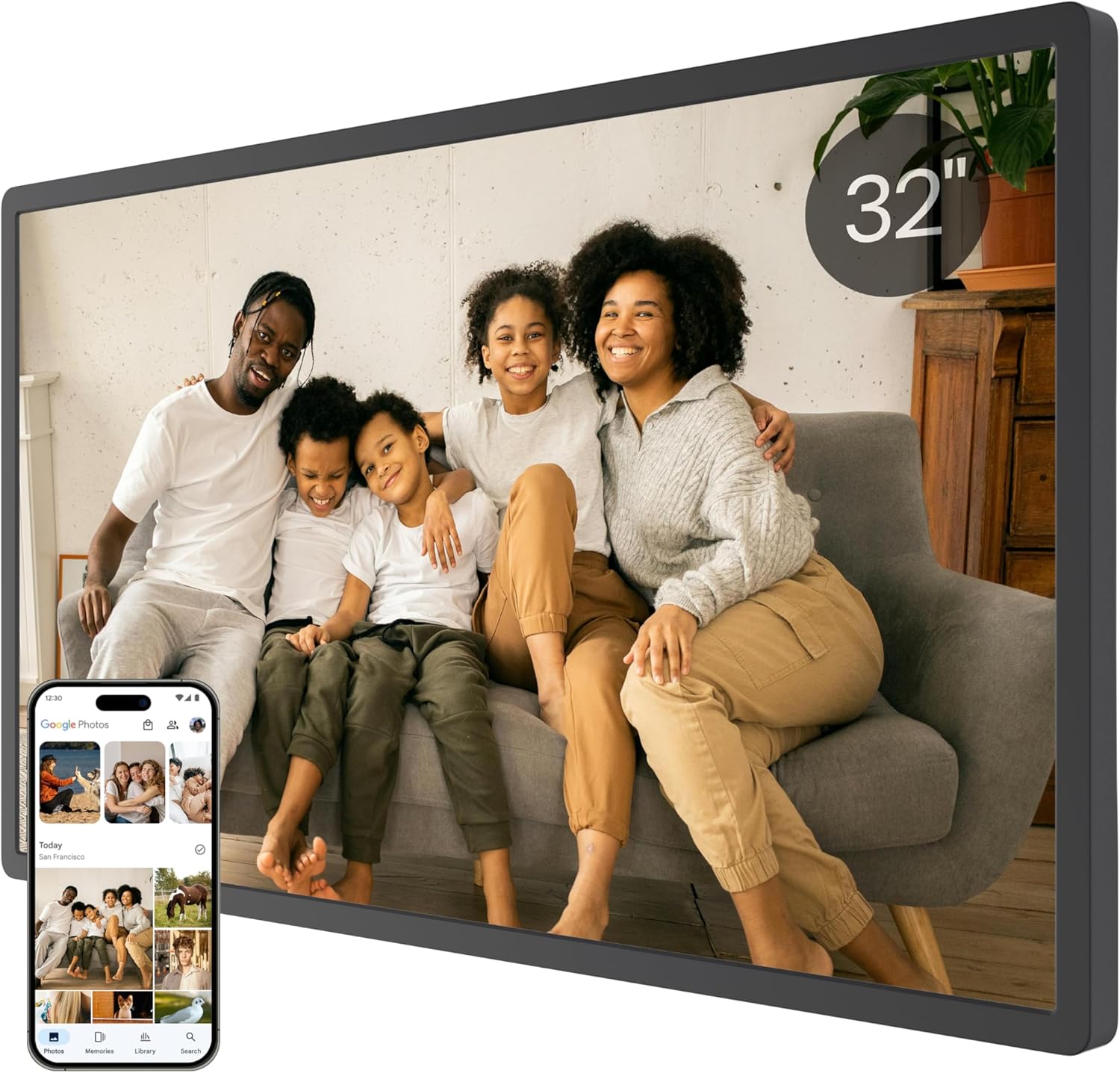
The 32-inch Cozyla, the flagship model, is designed to hold memories, not merely photographs.Notable features include a 32-inch screen, unlimited storage, real-time remote sync, voice recollections, AI photo restoration, and smart display adaptability. There are also no membership fees.Artificial intelligence (AI) restoration fixes faded or damaged family images, while voice recollections allow loved ones to add a voice memo to a photo. Buyers emphasize that there are no obligations associated with a monthly plan.
Its shortcomings include being a younger company with less experience, having AI features that require time for the app to understand, and requiring dedicated wall space due to its enormous footprint.Ideal for: those gathering old photographs to digitize so grandchildren can enjoy them. Customers looking for a basic slideshow should look elsewhere.This is the most significant present here.
Things to Consider Before Buying a Digital Photo Frame:
Choosing a digital photo frame may seem straightforward, but various factors can significantly influence your experience. From display quality to connectivity options, making a well-informed decision ensures that your cherished memories are showcased in the best light. Explore key considerations that will enhance your enjoyment of this innovative device.
Wi-Fi and Cloud-Connected Frames
Wi-Fi and cloud-connected frames enable you to upload photos directly from your smartphone or computer without needing to physically transfer files. Many models offer features like remote control access and the ability to retrieve images from social media platforms. Automatic updates allow for real-time sharing of moments, making them ideal for families who want to keep their loved ones updated. Some frames even include options for subscribing to photo streams with friends or family, enhancing interconnectedness.
USB, Memory-Card, and App-Based Frames
Frames that rely on USB, memory cards, or apps typically provide a straightforward approach to displaying photos. Many options allow you to insert a USB stick or memory card to show your images instantly. App-based features might enable additional editing or slideshow options, making them user-friendly. For those who prefer a more traditional method, these frames often support a wider range of file formats compared to Wi-Fi models, ensuring versatility in playback.
Display quality, size, and aspect ratio
Display quality significantly impacts viewing enjoyment. Higher pixel resolution enhances sharpness and detail, making images more lifelike. Size should correlate with your intended placement, whether on a tabletop or wall. Aspect ratio, commonly 4:3 or 16:9, affects how images appear; consider the format of your photos when making a selection. Those wishing to showcase a wider variety of images may prefer a larger, widescreen frame for better visual appeal.
Storage, file compatibility, and connectivity
Storage capacity determines how many photos a frame can hold, so look for options ranging from basic internal memory to expandable SD cards. File compatibility is crucial, as some frames may only support specific formats like JPEG or PNG. Connectivity options like Wi-Fi and Bluetooth allow for easy photo transfers from smartphones or cloud services. Opting for a frame with versatile connectivity enhances its usability and keeps your displayed images fresh.
Ease of setup and sharing
Setup simplicity greatly affects your overall experience. Many digital photo frames now offer straightforward user interfaces, but some models may require more complicated installation processes. Sharing capabilities should also be a consideration; features like mobile apps or email functionality can make it easier to share moments with family and friends. Selecting a frame that prioritizes both user-friendly setup and efficient photo sharing will save you time and frustration.
Match the frame to its location and viewers
The location of the digital photo frame impacts your choice significantly. A frame placed in a bright living room may require a higher brightness display, while one in a darker bedroom might not. Additionally, consider who will frequently view the frame; a family-oriented design may benefit from user-friendly interfaces or varied display modes that cater to all ages. Tailoring the frame to its setting enhances your viewing experience and satisfaction.
Check subscriptions, privacy, and ongoing costs
Assessing ongoing costs associated with digital photo frames can prevent unexpected expenses. Some models may require a subscription for cloud storage or advanced features, which can add up over time. Privacy also plays a role; ensure that any connected services offer robust data protection. Scrutinizing these factors aids in making an informed decision and in avoiding potential complications later on.
Set priorities and compare shortlisted models
Evaluate your specific needs by prioritizing features that align with your usage. Consider whether wireless connectivity, screen size, or photo quality is more essential for your preferences. After creating a shortlist of models, compare them based on these features, as well as user reviews and ratings. This systematic approach ensures that you select a frame that meets your requirements while avoiding unnecessary extras that may inflate your budget.
Verify compatibility, warranty, and return policy
Check the compatibility of your selected digital photo frame with various photo formats and connection methods, such as USB or Bluetooth. Understanding the warranty terms can also provide peace of mind, as it may cover any manufacturing defects for an extended period. Lastly, ensure that the store offers a reasonable return policy; this allows you the option to return or exchange the frame if it does not meet your expectations.
Benefits of sharing and updating photos
Upgrading the visual experience is one of the strongest advantages digital photo frames offer. Share images via email or social media, allowing family and friends to contribute to your display effortlessly. Many models support cloud storage, making updates instantaneous; you can even send new photos while traveling. This capability transforms your frame into a living gallery that evolves over time, providing a fresh look at cherished memories.
Limitations to consider before buying
Technical limitations may pose challenges when choosing a digital photo frame. Battery life becomes a concern for wireless models that require regular charging for uninterrupted use. Compatibility issues can also arise with various photo formats or cloud services, potentially limiting your options for sharing. Understanding these constraints helps prepare you for maintenance and could affect your satisfaction with the purchase down the line.
Conclusion
Purchasing a digital photo frame requires careful consideration of various factors, including display quality, storage capacity, and connectivity options. Assessing the intended use can guide your choice-whether for creating a family centerpiece or an artistic display. Budget constraints also play a role in determining features that align with your needs. Familiarity with brand reputations and customer reviews can further enhance your confidence in making a well-informed decision.
Leave a Reply