
Searching for the best laptops for college students can feel absolutely overwhelming. You need a reliable, budget-friendly machine that won’t quit on you during finals week. We’ve eliminated the stress by testing the top student laptops for performance and all-day battery life. This definitive guide makes it simple to discover the perfect device to conquer your coursework with confidence. Let’s find the right one for you so you can start the semester strong.
Contents
- Top 5 Laptops for College Students:
- 1. Apple MacBook Air – Best Laptop for College Students Overall
- 2. Microsoft Surface Pro – Best 2-in-1 Laptop for College Students
- 3. Acer Nitro V – Best Gaming Laptop for College Students
- 4. Acer Swift Go 14 – Best Thin & Light Laptop for College Students
- 5. ASUS Chromebook CX15 – Best Budget Laptop for College Students
- Things to Consider Before Buying a Laptops for College Student:
- Assessing Your Field of Study’s Demands
- Understanding Essential Software Requirements
- The Hardware Hierarchy: Specs that Matter
- Processor Power: Navigating Performance Metrics
- Memory and Storage: Balancing Speed and Capacity
- Battery Life: Choosing Longevity Over Flash
- Weighing Size and Weight for Campus Commuting
- Evaluating Durability for Student Life
- Comparing Top Brands: Reputation vs. Performance
- Reading Reviews: Separating Are Truth from Marketing Hype
- Final Words
Top 5 Laptops for College Students:
1. Apple MacBook Air – Best Laptop for College Students Overall

If you’re willing to toss aside the heavy, overused laptop and treat yourself to something that can keep up with your college hustle, then the Apple MacBook Air with the M4 chip is just waiting to be your new study buddy. Lightweight, slim and wicked fast, this rig will take you through lectures — and into late-night projects, marathon Zooms and all those “just one more episode” study breaks.
Multitasking You won’t even notice the amount of power under the hood thanks to the M4 chip. Whether you’re editing video for a class project, bouncing between research tabs or sneaking in a few rounds of gaming, this MacBook never stutters. And with Apple Intelligence built in, you have an intelligent assistant to help with the writing, so you can focus on your ideas and finalizing your work.
Battery anxiety? Not here. With up to 18 hours of life, you can slog through lecture after lecture, study marathon after study marathon and still have juice to watch “Selling Sunset” on Netflix in bed. Now combine that with the 13.6-inch Liquid Retina display — with more than a billion colors — and suddenly your lecture slides, films and creative concepts burst into sharp remarkable colour.
And when it’s time for a group call, the 12MP Center Stage camera, triple mic system and four-speaker sound system with Spatial Audio ensure you look and sound like the star of the show.
If you need a lightweight laptop, but also something heavy on performance, the MacBook Air M4 is your golden ticket to college success.
2. Microsoft Surface Pro – Best 2-in-1 Laptop for College Students

If you’re looking for something that multitasks as hard as you do — practically failing to sweat while doing so — then the Microsoft Surface Pro is your new college life secret weapon. This 2-in-1 wonder gives you the power of a laptop and the convenience of a tablet all in one device, all at a stellar price. Whether you’re working on a paper or doing some sketches, it seamlessly connects to your work flow no matter which app you are using, whether it’s with the detachable keyboard (sold separately) when you’re writing papers or the Book Cover (sold separately) when you’re browsing at the library.
Fueled by the Snapdragon X Plus processor and its stupid smart AI engine, the Surface Pro does multitasking like a boss. That’s 45 trillion operations a second —translation: you can switch back and forth between research tabs, class notes and the latest from your Spotify playlist without staring at that cursed spinning wheel of doom.
16 hours of battery time mean you’re good to camp out in the library or coz up in a coffee shop without scouring for an outlet every few hours. And for relaxation time, the 12-inch PixelSense touchscreen gives you vibrant colors and crisp details for streaming, scrolling or gaming on the side.
Ultra-slim, lightweight and powerful, the Surface Pro reinvents portable power, with unprecedented battery life for a tablet. If you’re looking for a laptop that’s willing to twist and turn to accommodate you instead of the other way around, this 2-in-1 has got your back.
3. Acer Nitro V – Best Gaming Laptop for College Students

If you’re searching for a gaming laptop that’ll double as your college workhorse, let the Acer Nitro V rise to the occasion. It runs with Intel’s Core i7-13620H to let potential buyers know that this machine can do more than just juggle. Whether you are raiding dungeons or tackling grainy editing, everything will have the speed and power to keep up with ease, performing without any glitches.
But enough about the graphics, which are when the jeopardy really begins. Pumping games with AI-powered visual upgrades, the Nitro V features NVIDIA’s GeForce RTX 4050 with DLSS 3.5. From mind-blowing ray tracing to ultrasmooth frame rates, you’ll think you’re gaming on a rig that costs twice as much. In other words, your virtual worlds have received a major glow-up.
And the Nitro V has no reservations on the display side of things, either. The 15.6-inch Full HD screen sports a 165Hz refresh rate, allowing you to achieve those breakneck headshots or watch the action scenes without any delay, lag or ghosting. Toss in the broad 16:9 aspect ratio and what you have is more screen real estate for multitasking as well.
Whether you’re up all night gaming or up all night studying for the test or even studying all night for that test or pulling an all-nighter at the library, the Acer Nitro V keeps you on key and in the game. If you’re prepared to upgrade your grades and killstreaks, this laptop has your back.
4. Acer Swift Go 14 – Best Thin & Light Laptop for College Students

If you’re in need of a laptop as stylish as it is clever, the Acer Swift Go 14 is screaming your name. Slim, stylish, and surprisingly powerful, this thin-and-light workhorse is designed for your busiest college days and nights, and still slips easily into a backpack. Grappling with Intel’s latest Core Ultra 7 processor with 16 cores, 22 threads, and Intel Arc graphics, expect your number-crunching tasks and late-night Netflix sprints to be done in style.
Talking Display Not only does the 14-inch WUXGA IPS touchscreen look great—and it does—it stuns. With 100% sRGB color accuracy, your slides, stories, and content come to life and jump off the screen in brilliant detail while in class or out. Prefer to swipe and tap instead of type? The touchscreen’s got you covered.
Intelligence This laptop is not only about performance though. Now that you can have their help with Windows 11 and Copilot, it can be like having an AI-enabled sidekick to help you quickly and efficiently get things done. Whether you’re fielding emails, coordinating group chat or creating content, the Swift Go will keep up with you.
5. ASUS Chromebook CX15 – Best Budget Laptop for College Students
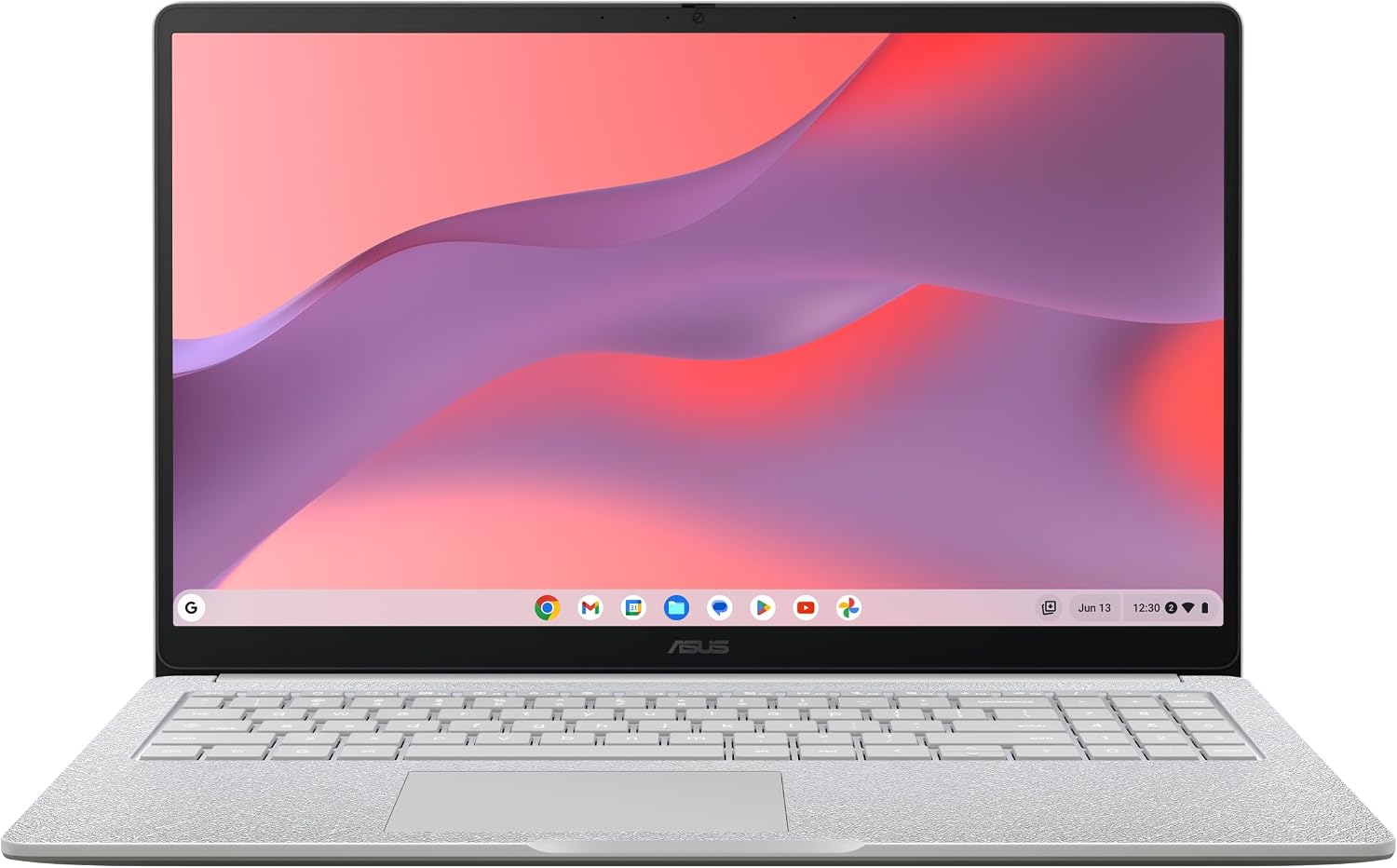
If you are in the market for a laptop that won’t deplete your bank account but will totally crush your college to-do list, the ASUS Chromebook CX15 is a solid choice. Its 15.6-inch display gives you enough screen real estate for essays, spreadsheets and — you guessed it — your favorite YouTube study playlists. And because it’s running ChromeOS, you’ve got Gmail, Docs, Photos, and all the Google basics built right in, all ready to go on day one.
This Chromebook is also no time-waiting machine. It turns on in less than 10 seconds, so you can get to work or play with time to spare. Tack on long battery life and you’re good for back to back classes, coffee shop study sessions, and Netflix binging — all on a single charge.
It runs on the Intel Celeron N4500 processor along with 8GB of RAM for responsive, lag-free performance as you’re working or relaxing on it. And with 128GB of storage, you’ll be able to take your files with you on the go without constantly having to delete old projects.
And here’s a kicker: You score a 3-month trial of YouTube Premium and Google One AI Premium, featuring Gemini Advanced and 2TB of cloud storage. That’s smarter writing help and ample room for backing up your work.
Portable and military-grade tough, weighing a mere 3.5 pounds, ASUS Chromebook CX15 can stand up to the rigors of dorm life, yet light enough to take to class in a backpack and powerful enough to keep pace with the college hustle.
Things to Consider Before Buying a Laptops for College Student:
Just weigh performance needs against budget and portability when choosing a laptop for college; assess processor, RAM, storage, battery life, display, build quality, and keyboard comfort to match your coursework and lifestyle. Consider software compatibility, upgradeability, warranty, and campus tech support, and prioritize a balance between durability and weight so your laptop serves you reliably through classes, projects, and study sessions.
Assessing Your Field of Study’s Demands
Engineering and architecture students benefit from quad-core or higher CPUs, 16GB+ RAM, discrete GPUs (e.g., NVIDIA GTX/RTX) and 512GB+ NVMe SSDs to handle SolidWorks, AutoCAD, and FEA tools. Computer science prefers multi-core CPUs and fast SSDs for compiles and VMs. Humanities and social sciences usually work fine with 8GB RAM, integrated graphics, long battery life, and lighter 2–3 lb machines for constant note-taking.
Understanding Essential Software Requirements
Check departmental software lists for exact versions: MATLAB and RStudio run on modest specs but Simulink and large datasets need 16GB+. Adobe Photoshop recommends 8GB minimum, 16GB+ for large PSDs; Premiere Pro and DaVinci Resolve perform best with 16–32GB RAM, a GPU with 4–8GB VRAM, and NVMe storage. Note platform limits—SolidWorks is Windows-only without virtualization—so confirm OS compatibility before buying.
Investigate campus licensing and cloud alternatives: universities often provide free MATLAB, SPSS, and Adobe Creative Cloud or remote desktops with high-end GPUs, letting you opt for a lighter laptop. For on-device work, prioritize an NVMe SSD (512GB–1TB for video), a GPU with CUDA support for accelerated rendering, and consider virtualization options like Parallels or Boot Camp if specific Windows-only applications are required.
The Hardware Hierarchy: Specs that Matter
Prioritize CPU, RAM, storage, GPU, and battery in that order based on your major: a 6-core Intel Core i5/i7 (11th–13th gen) or AMD Ryzen 5/7 (4000–7000 series) handles coding and light editing, 8–16GB RAM supports multitasking, and a 256–512GB NVMe SSD keeps boot and app loads under 10 seconds. Integrated GPUs suffice for most coursework; pick a discrete GPU (e.g., NVIDIA GTX/RTX or AMD Radeon) only for 3D work or heavy video rendering.
You should look at core count, thread count, base/turbo clocks, and TDP: a 4–6 core, 8–12 thread CPU at 15–35W TDP (e.g., Intel i5-1235U or Ryzen 5 5600U) offers strong battery-life tradeoffs, while 45W H-series chips (i7-12700H, Ryzen 7 6800H) deliver desktop-class speed for compiling large codebases or exporting 4K video. Prioritize single-core turbo for responsiveness and multi-core for parallel workloads.
Memory and Storage: Balancing Speed and Capacity
You want 8GB minimum, 16GB recommended for heavy multitasking or VMs; dual-channel DDR4/LPDDR4x or DDR5 increases throughput. For storage, NVMe M.2 SSDs outperform SATA by 3–5x in sequential reads—256GB NVMe is the entry point, 512GB+ preferred if you work with large media. Check for user-upgradeable SODIMM or spare M.2 slots to extend lifespan affordably.
Consider concrete configs: a 16GB DDR4 dual-channel kit plus a 512GB NVMe SSD gives responsive app switching and 2–3 second app launches; students in CS or design can benefit from an extra M.2 slot for adding a 1TB SSD later. Benchmark differences matter—PCIe 3.0 NVMe drives typically provide 2,000–3,500 MB/s reads, while PCIe 4.0 drives push 5,000–7,000 MB/s, speeding large-file transfers and virtual machine performance. Check whether RAM is soldered—if it is, opt for the highest practical capacity at purchase.
Battery Life: Choosing Longevity Over Flash
Target real-world 8–12 hours for all-day classes; look for 50–70 Wh battery packs and power-efficient CPUs (U-series or Apple M-series). High-res or 120Hz displays can cut endurance by 20–40%, so choose 60–90 Hz or enable adaptive refresh. Fast-charge capability (e.g., 50% in 30 minutes) and USB-C charging add flexibility between lectures and labs.
Manufacturer claims often cite ideal conditions—expect 20–30% lower runtime in mixed use (Wi‑Fi, browser tabs, video). You can extend usable lifespan by avoiding constant full discharges, keeping screen brightness at 40–60%, and disabling unused radios. Battery health typically drops after 300–500 full charge cycles; models with user-replaceable batteries or accessible service centers (Lenovo, Dell) reduce long-term total cost of ownership if you plan to keep the laptop through multiple academic years.
Weighing Size and Weight for Campus Commuting
Choose a 13–14″ laptop if you carry it all day—models like the MacBook Air (around 2.7–3 lbs) and many ultrabooks hit 10–13 mm thickness and 12–18 hour battery life; 15″ machines offer better thermals and discrete GPUs but usually weigh 4–5 lbs, affecting bike or bus commutes. Factor your backpack load, class schedule, and whether you’ll edit video or code—sometimes a slightly heavier 15″ saves you time by running demanding apps without throttling.
Evaluating Durability for Student Life
Spot laptops with aluminum or magnesium chassis, reinforced corners, and hinge ratings of 20,000+ cycles to survive dorm and transit use; MIL‑STD‑810G/H certification or IP53 dust/water resistance signals tougher builds found in business-grade models like Lenovo ThinkPad and Dell Latitude. Check for spill-resistant keyboards and easy-access panels so you can replace SSDs or upgrade RAM to extend service life.
Focus on real-world tests and repairability: read teardown guides to see if the battery and storage are user‑replaceable, and look for vendor repair scores or warranty options. Devices designed for enterprise often include rubber bumpers, shock-absorbing mounts, and thicker display glass (Gorilla Glass on some convertibles) that reduce repair costs and downtime over a 3–5 year college cycle.
Comparing Top Brands: Reputation vs. Performance
You’ll weigh trade-offs: Apple often delivers sustained battery life and consistent macOS optimization, Dell XPS/Precision emphasize premium chassis and strong service plans, Lenovo ThinkPad lines focus on durable keyboards and business support, HP Spectre/EliteBook balance design with enterprise features, and Asus/Acer aim for aggressive pricing and good value. Expect standard 1-year warranties across consumer models, while business lines frequently offer 3-year options and on-site service for a predictable total cost of ownership.
Reading Reviews: Separating Are Truth from Marketing Hype
You should prioritize long-term and measurements-based reviews over marketing copy: look for real-world battery tests (hours under web browsing or video playback), thermal throttling charts, SSD and RAM vendor IDs, and verified teardown photos. Trusted outlets like Notebookcheck and AnandTech often publish repeatable benchmarks; cross-check launch-spec claims against measured CPU sustain wattage and battery Wh to spot inflated marketing numbers.
You’ll also mine user reviews for patterns: multiple complaints about fan noise, coil whine, or early battery degradation across different retailers suggests hardware-level issues. Pay attention to firmware update cadence—regular BIOS/driver updates signal active post-sale support—and compare return rates or RMA anecdotes on forums to assess reliability risk before you buy.
Final Words
Taking this into account, you should weigh performance, battery life, build quality, portability, and budget against your coursework and lifestyle; prioritize a reliable processor, sufficient RAM and storage, and a comfortable keyboard, and verify warranty and student discounts so your laptop supports study, collaboration, and longevity throughout college.
Leave a Reply